Lecture Recording Notes Without Rewatching It All
Take short notes in class and mark the moments you lose track with a timestamp. Afterward, jump only to those timestamps in the recording, fill the gaps, then turn your notes into questions. Rewatching whole lectures costs hours and works like rereading, which is a weak way to study.
Having every lecture on video feels like a safety net, and it can be one. But a recording also makes it tempting to stop listening in class and to rewatch hours of footage before an exam. Good lecture recording notes use the recording for one narrow job: filling the gaps in notes you already took. This guide shows a routine that keeps that job short.
Should you rewatch whole lecture recordings?
Usually not. Watching a full lecture again is a passive review, much like rereading notes, and it takes as long as the lecture itself. Rewatch only the parts you marked as confusing, and spend the saved time testing yourself.
Rewatching feels productive because the material looks familiar the second time. Familiar is not the same as remembered. In a well-known experiment by Roediger and Karpicke, students who studied a passage four times did best on a test five minutes later. A week later they did worst, recalling 40% of the passage, while students who had studied it once and then tested themselves three times recalled 61%.
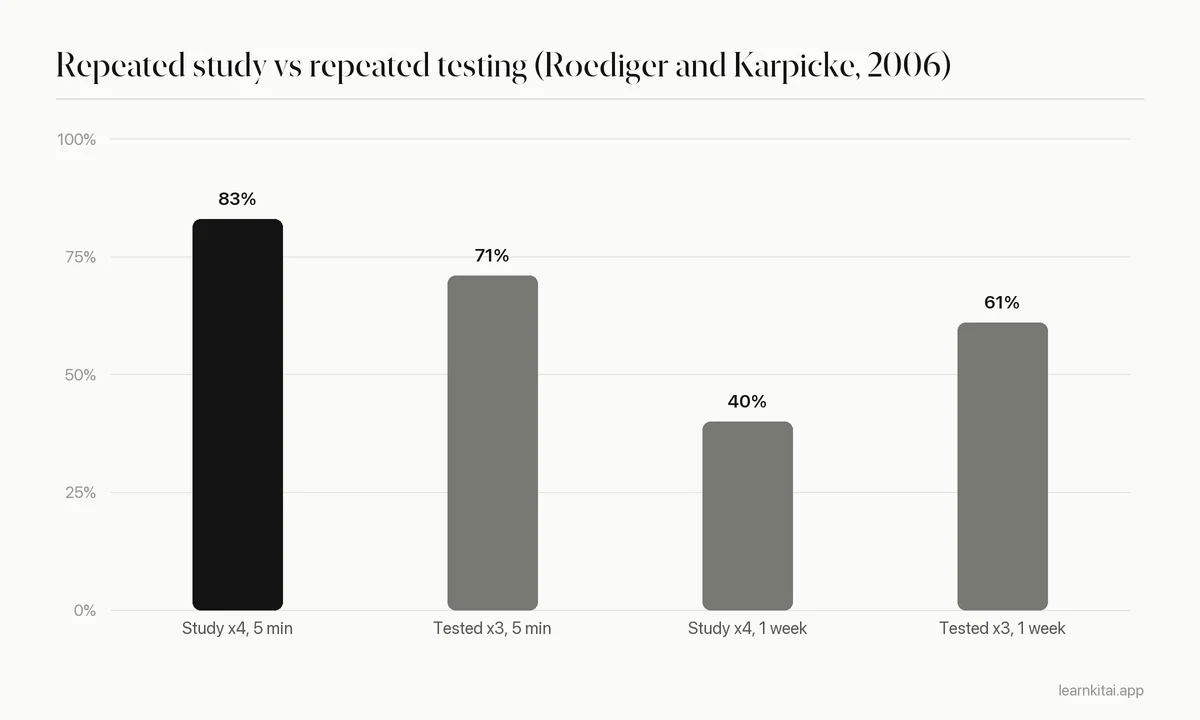
A full rewatch is the lecture version of studying four times. It wins on the night you do it and loses by exam week. The recording is most useful when you treat it as a reference you search, not a show you replay.
How do you take notes from a lecture recording step by step?
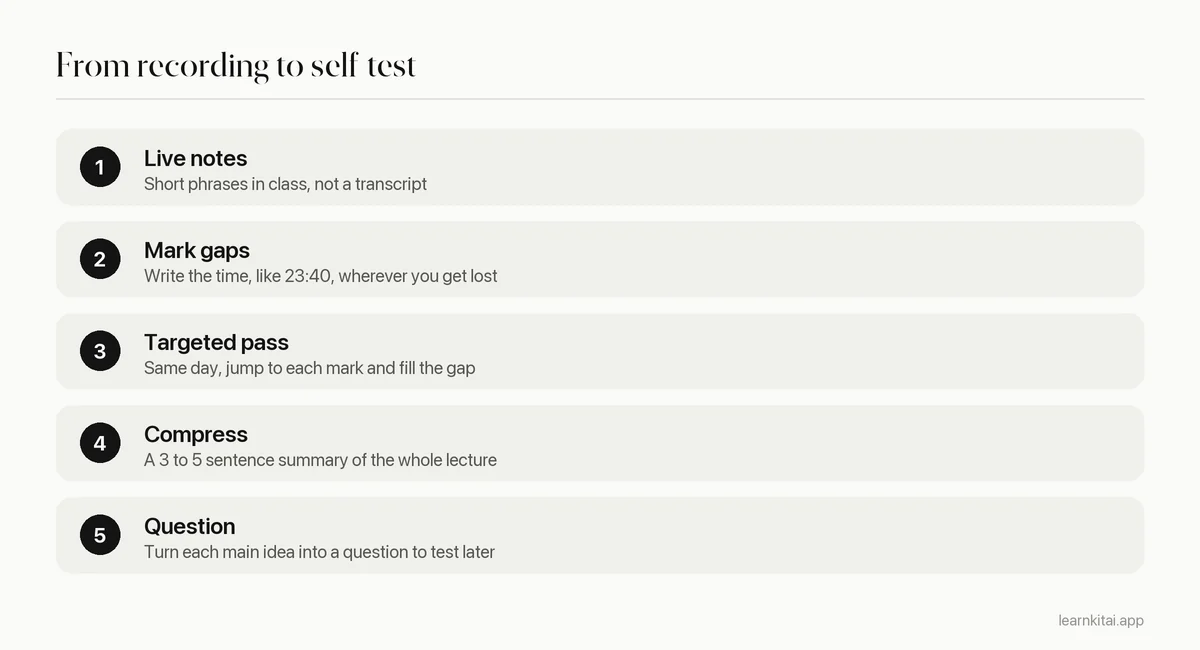
Attend and take short notes with timestamps at confusing moments. The same day, jump to those timestamps and fill the gaps. Then write a short summary and a set of questions, and test yourself on the questions two days later.
Step 1: take live notes anyway
Even with a recording, write notes in class. Choosing what to write is how you process the lecture. A study by Mueller and Oppenheimer found that students who typed notes tended to transcribe the lecture word for word, and they did worse on conceptual questions than students who wrote in their own words. A recording makes verbatim copying pointless, so let it free you to write less and think more.
Step 2: mark the gaps with timestamps
When you lose the thread, do not try to catch up. Note the time on the lecture clock or your phone and keep listening. A note like "23:40, lost the second derivation" takes three seconds and saves you from scrubbing through a whole video later. Most lectures produce three to six marks.
Step 3: one targeted pass, the same day
Open the recording, jump to each mark, and watch only until the gap is filled. Playing at a slightly faster speed is fine for familiar parts. Pause and slow down for the confusing ones. Add what you learn to your notes in a different color, so you can see which ideas cost you effort.
How long should lecture recording notes take?
With a targeted pass, plan about 15 to 25 minutes for a typical 50-minute lecture: 10 to 15 minutes at your marked timestamps and 5 to 10 minutes for a summary and questions. A full rewatch with pauses can easily take longer than the lecture itself.
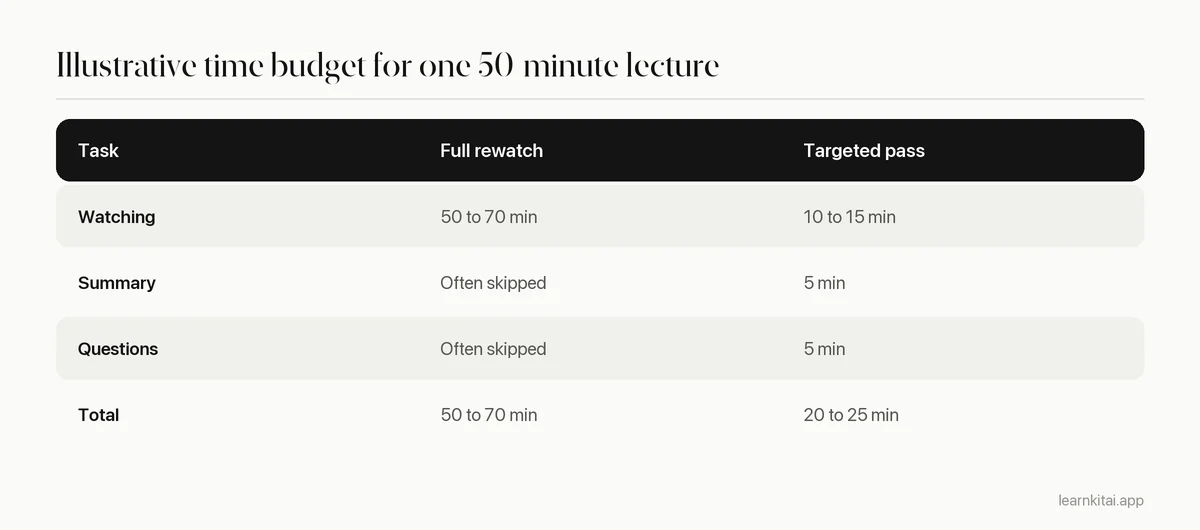
These numbers are a planning guide, not a measurement, and dense courses like organic chemistry will take longer. The point is the shape: most of your time should go to compressing and testing, not to watching. If your lecture recording notes keep taking longer than the lecture itself, that is a sign you are transcribing rather than filling gaps.
A worked example
Say your economics lecture covers price elasticity. In class you write short notes and mark two gaps: "14:10, missed why luxury goods are elastic" and "38:30, lost the midpoint formula". That evening you jump to 14:10 and watch four minutes, then to 38:30 and watch six. You add both explanations in blue. Then you write a summary: elasticity measures how much quantity demanded responds to price; goods with close substitutes and luxuries respond more; the midpoint formula gives the same answer in both directions. Finally you write three questions, such as "Why is demand for insulin inelastic?" Total time: about twenty minutes, and your lecture recording notes now include a ready-made self-test.
What if you missed the lecture entirely?
Then watch it once, at normal speed, and take notes as if you were in the room, with timestamps at the hard parts. Do not pause after every sentence. Pausing turns note-taking into transcription, which is slow and teaches less.
Missing a class happens, and recordings make it recoverable. Research on how students use recordings suggests they mostly treat them as a supplement. In a survey of 660 students at a New Zealand university, published in TechTrends, students reported using lecture recordings alongside attending, not as a replacement, and said recordings helped when illness or work kept them from class.
If you need to watch a whole lecture, a structure like Cornell notes keeps you active: notes on the right while you watch, questions on the left afterward. For online lectures on YouTube, our guide to summarizing a YouTube lecture covers chapters, transcripts and speed settings.
Can you use a transcript or AI summary instead?
A transcript is useful for searching and checking quotes, but reading it end to end is just slower rereading. An AI summary can show you the structure of a lecture quickly. Either one works best as a check on your own notes, not as a replacement for them.
The LearnKit iPhone app can record a lecture and turn it into a summary, flashcards or quiz questions. That is useful for a quick structure check, or for questions to test yourself with. Read the output against your own notes, though: a summary only tells you what was said, while your notes show what you understood.
Finish every lecture with questions, not just notes. Our guides on turning notes into flashcards and quizzing yourself from notes show how. For the bigger picture of condensing material, see how to summarize a textbook chapter.
Frequently asked questions
Is it better to attend lectures or watch the recordings?
Attending is usually better when you can, because you take notes in real time and can ask questions. Use recordings to fill gaps and to catch up on classes you had to miss.
What playback speed is best for recorded lectures?
For a targeted pass, a bit faster than normal works for parts you half understand. Slow down or pause for the parts that confused you. Very high speeds make it hard to take notes in your own words.
Should I transcribe my lecture recordings?
Not by hand. Manual transcription takes hours and mostly copies words. If your school provides a transcript, use it to search for terms and check details, then write your own short notes.
How soon after class should I review the recording?
The same day is ideal, while you still remember where you got lost. If that is not possible, aim for within two days, and always before the next lecture in the same course.
Sources
- Test-enhanced learning: taking memory tests improves long-term retention, Psychological Science (Roediger and Karpicke, 2006) (Experiment 2: repeated study 83% at 5 minutes but 40% at one week; repeated testing 71% and 61%)
- The pen is mightier than the keyboard: advantages of longhand over laptop note taking, Psychological Science (Mueller and Oppenheimer, 2014) (Verbatim transcription linked to worse conceptual performance)
- Sentiment Analysis of Student Engagement with Lecture Recording, TechTrends (2021) (Survey of 660 students; recordings used as supplements rather than substitutes for attendance)
Keep reading
How to Summarize a Chapter So You Never Reread It
Most chapter summaries are just shorter copies of the book. The closed-book method turns summarizing into practice that sticks, so you can study from your page instead of the chapter.

Summarize YouTube Video Lectures Into Notes You Can Test
An hour-long lecture does not need an hour of notes. Here is how to turn a YouTube video into a one-page, timestamped summary you can actually study from.
Cornell Notes: The Page That Quizzes You Back
A Cornell page is not just a neat layout. Its left column turns your notes into a built-in self-test you can run in ten minutes.
Turn Notes Into Flashcards in 20 Minutes After Class
Your lecture notes are a reading pile until you turn them into questions. A simple 20-minute routine converts each class into cards you can actually test yourself with.
Quiz Yourself From Your Notes in 15 Minutes a Day
Your notes already contain the questions. Here is how to pull them out, five ways to test yourself, and a short daily routine that keeps old topics alive.