Cornell Notes: The Page That Quizzes You Back
Cornell notes split a page into three parts: a wide column for notes during class, a narrow cue column for questions you write afterward, and a short summary at the bottom. You review by covering the notes, reading each question, and answering from memory, so the page doubles as a self-test.
Most notes are written once and then reread many times, which is the wrong way around. Cornell notes fix this by giving every page a second job: first it holds what you heard in class, and later it quizzes you on it. The layout looks simple, but the payoff comes from what you do with the empty column after the lecture ends.
The system was developed by Walter Pauk, an education professor at Cornell, and described in his book How to Study in College. Cornell's own Learning Strategies Center still teaches it to students today. Below you will find the page setup, a worked example, and a review routine you can start this week.
How do you set up a Cornell notes page?
Draw a horizontal line about five lines above the bottom of the page for the summary. Then draw a vertical line so the left column takes roughly a quarter to a third of the width. The big right area is for notes during class.
You need three zones, which you can draw by hand in a minute or design once as a printable template.
- Notes column (right, wide): what you record during the lecture or while reading. Short phrases, not full sentences.
- Cue column (left, narrow): left blank in class. After class you add questions and keywords that point to the notes beside them.
- Summary strip (bottom): two to four sentences in your own words that say what the whole page was about.
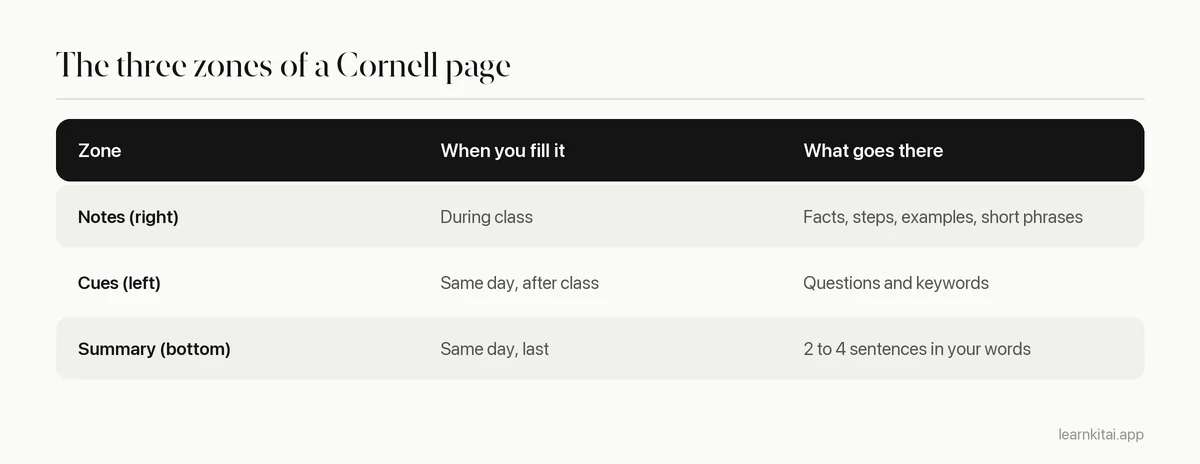
Leave space between ideas in the notes column. Each gap is where a cue will sit later. If the notes are packed edge to edge, your questions will have nowhere to line up.
What do you write in the cue column?
Write questions that the notes beside them answer. Good cues ask why, how, or what is the difference, not just what. Each cue should be answerable in a sentence or two without peeking.
The cue column is the heart of the method, and it is also where most students go wrong, because they copy headings into it, like "Photosynthesis" or "Causes of WWI". A heading only tells you where you are, while a question makes you pull the answer out of memory.
Here is an example from a biology lecture. The notes column says: light reactions happen in the thylakoid membrane, use water, release oxygen, make ATP and NADPH. A weak cue would be "Light reactions". Strong cues would be:
- Where do the light reactions happen?
- What goes in and what comes out of the light reactions?
- Why does the plant release oxygen at this stage?
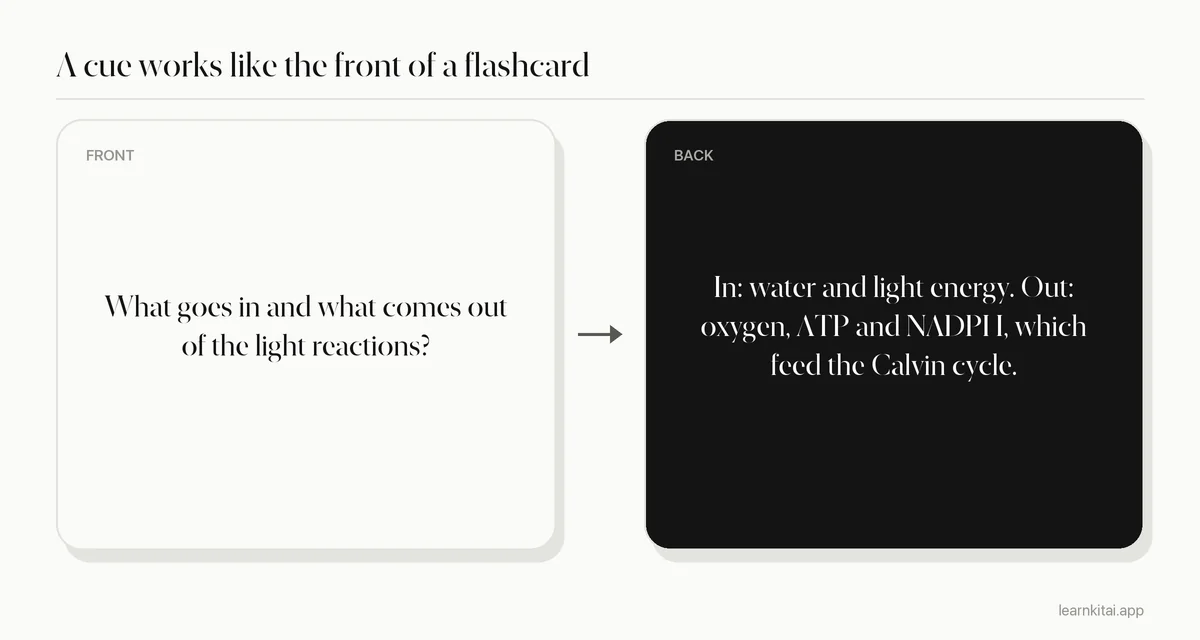
Notice that each cue is really the front of a flashcard, and the notes beside it are the back. That is why Cornell pages convert so easily into decks. If you already use cards, our guide to turning notes into flashcards shows how to move the best cues over.
Why do Cornell notes work better than plain notes?
They build retrieval practice into the page. Covering the notes and answering the cues is a small test, and testing yourself leads to better long-term memory than rereading the same material.
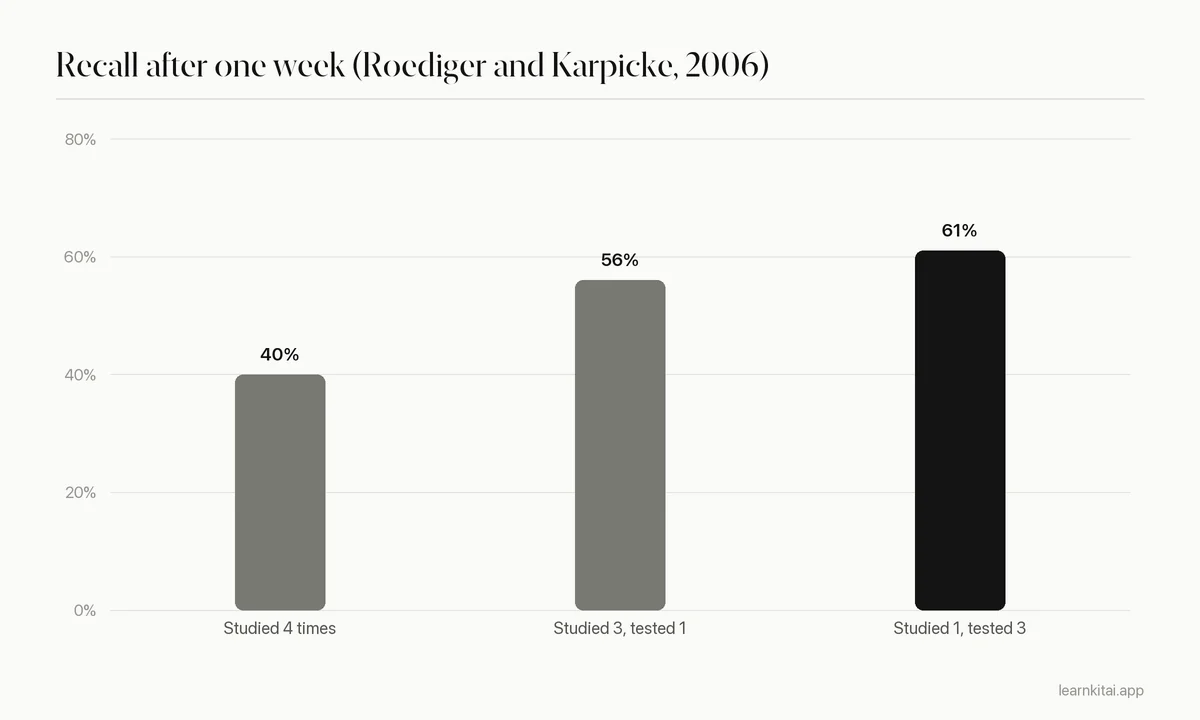
The layout itself is not magic. The gain comes from the review step, which is a form of active recall. In a well-known study by Roediger and Karpicke, students who took recall tests on a passage remembered 61% of it a week later. Students who only reread it four times remembered 40%. Rereading felt more comfortable in the moment, yet it held up far worse over the following week.
A second reason is that writing cues forces you to process the material. A study by Mueller and Oppenheimer found that students who typed lecture notes tended to copy the speaker word for word, and they did worse on conceptual questions. Turning your notes into questions is the opposite of copying, because you cannot ask a good question about something you have not understood.
How do you review Cornell notes each week?
Fill in cues and the summary within 24 hours. Then, two or three times a week, cover the notes column, answer each cue aloud, and mark the ones you miss. Spend your next session on the marked cues.
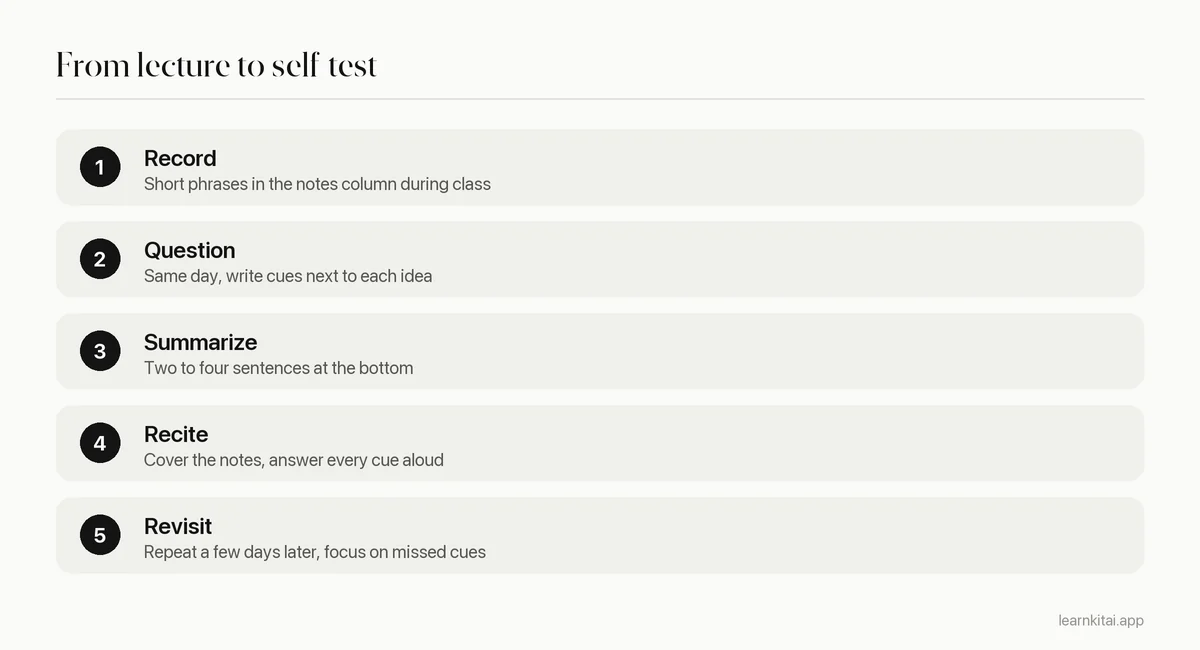
A simple marking system keeps this fast. Put a dot next to a cue each time you miss it. Cues with two or more dots go on a short list for your next session. Cues you answer cleanly three times in a row can be skipped until exam week. This spacing follows the same logic as spaced repetition: review what is fading, not what you already know.
What are common Cornell notes mistakes?
The big ones are writing the cue column during class, using headings instead of questions, skipping the summary, and never covering the notes to test yourself. Each one turns the system back into plain notes.
- Filling cues in class. You are busy listening. Cues written later are better because you know which ideas mattered.
- Topic labels as cues. "Mitosis" is a label. "What happens to the chromosomes in anaphase?" is a cue.
- Summaries that list topics. "This page covers enzymes" says nothing. "Enzymes speed up reactions by lowering activation energy, and heat or pH can change their shape" is a summary.
- Never testing. If you reread the right column every time, you are rereading. Cover it.
The summary line deserves extra care. Writing it is a small act of compression, the same skill covered in our guide on how to summarize a textbook chapter. If you cannot sum up a page in a few sentences, that page needs another look before the exam.
Can you use Cornell notes digitally?
Yes. A two-column table in any notes app works, with the summary as a final row. The rule is the same: hide the right column when you review. Some students paste their right column into a tool and ask it for questions, then edit the questions by hand. If you try that with LearnKit, treat the generated questions as a draft. Your own cues are often sharper because you know what your teacher stressed.
Start small. Set up one page for your next lecture, write five cues that evening, and test yourself on them two days later. If you miss two of the five, the method is already doing its job: it showed you what to study before the exam did.
Frequently asked questions
Are Cornell notes good for math?
They can be. Put worked steps in the notes column and use cues like "What is the first step when the equation has a fraction?" For heavy problem sets, pair the page with practice problems, since math is learned by doing, not by reading steps.
How big should the cue column be?
Roughly a quarter to a third of the page width is enough for short questions. If your cues keep spilling over, your notes chunks may be too large. Break them into smaller ideas with a cue each.
Should I rewrite my Cornell notes neatly?
Usually no. Rewriting takes time and mostly copies. That time is better spent on cues, the summary, and testing yourself. Rewrite only a page you could not read.
Can I use Cornell notes for reading assignments?
Yes. Take notes on the right while you read a section, then close the book and write cues on the left. Reading notes often produce better cues than lecture notes because you can control the pace.
Sources
- The Cornell Note Taking System, Cornell University Learning Strategies Center (Origin of the system with Walter Pauk and How to Study in College)
- Test-enhanced learning: taking memory tests improves long-term retention, Psychological Science (Roediger and Karpicke, 2006) (One-week recall of 61% after repeated testing versus 40% after repeated study (Experiment 2))
- The pen is mightier than the keyboard: advantages of longhand over laptop note taking, Psychological Science (Mueller and Oppenheimer, 2014) (Verbatim transcription in laptop notes linked to worse conceptual performance)
Keep reading
How to Summarize a Chapter So You Never Reread It
Most chapter summaries are just shorter copies of the book. The closed-book method turns summarizing into practice that sticks, so you can study from your page instead of the chapter.
Outline Note Taking: Build the Skeleton First
An outline shows which ideas sit under which. That structure makes notes faster to write, easier to review, and simple to turn into questions.
Turn Notes Into Flashcards in 20 Minutes After Class
Your lecture notes are a reading pile until you turn them into questions. A simple 20-minute routine converts each class into cards you can actually test yourself with.
Active Recall: Why Closing the Book Beats Rereading
Rereading feels productive but fades fast. Here is how to study by pulling answers out of memory, with a session plan, examples and the mistakes to avoid.
One Page Study Guide: Let the Space Limit Teach You
Squeezing a whole unit onto one page forces you to decide what matters. Here is a layout, a build routine, and the step most students skip.