Summarize YouTube Video Lectures Into Notes You Can Test
To summarize a YouTube lecture, split it into sections using chapter markers or topic changes, watch one section at a time, then pause and write its main point from memory with a timestamp. Use the transcript to check terms and numbers, compress the notes to one page, and end with questions you can test yourself on.
Lecture videos are easy to start and hard to finish well. You press play, take notes for ten minutes, drift for twenty, and end up with three pages that mostly copy the first slide. When you summarize YouTube video lectures with a plan, you end with one page you can study from and timestamps that take you straight back to anything unclear. This guide gives you a section-by-section method, a summary template, and a sensible way to use transcripts and AI summaries without handing over the thinking.
What is the fastest way to summarize a YouTube video?
Let an AI tool draft a summary from the transcript, then check it at a few timestamps. To learn from a video, though, watch a section, write its main point from memory and use the transcript only to check. Choose based on whether you need to know what it says or to remember it.
Both have a place. An AI draft is great for deciding whether a two-hour video is worth watching, or for a quick refresh. For anything you will be tested on, writing from memory matters. In Karpicke and Blunt's 2011 study, students who practiced recalling what they had read retained about 50% more a week later than students who built concept maps with the material in front of them. A summary written from memory is that same kind of recall.
How to summarize YouTube video lectures step by step
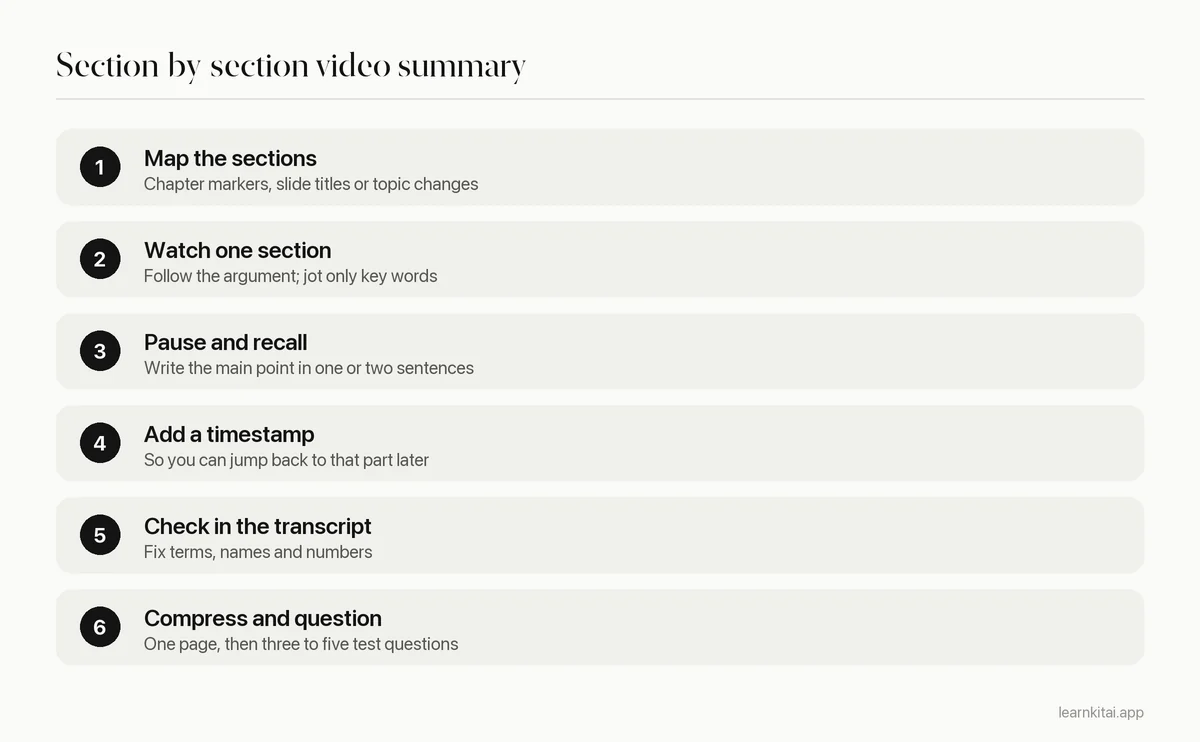
Mapping the sections first is what keeps this from turning into transcription. Many lecture uploads have chapter markers in the progress bar. If not, skim the transcript for phrases like now let's turn to or look for new slide titles. Five to eight sections for an hour-long lecture is typical.
What should a lecture summary include?
For each section: a timestamp, the main point in your own words, one example the lecturer used, and anything you did not understand. At the end: a two or three sentence overview of the whole lecture and a short list of questions that the summary answers.
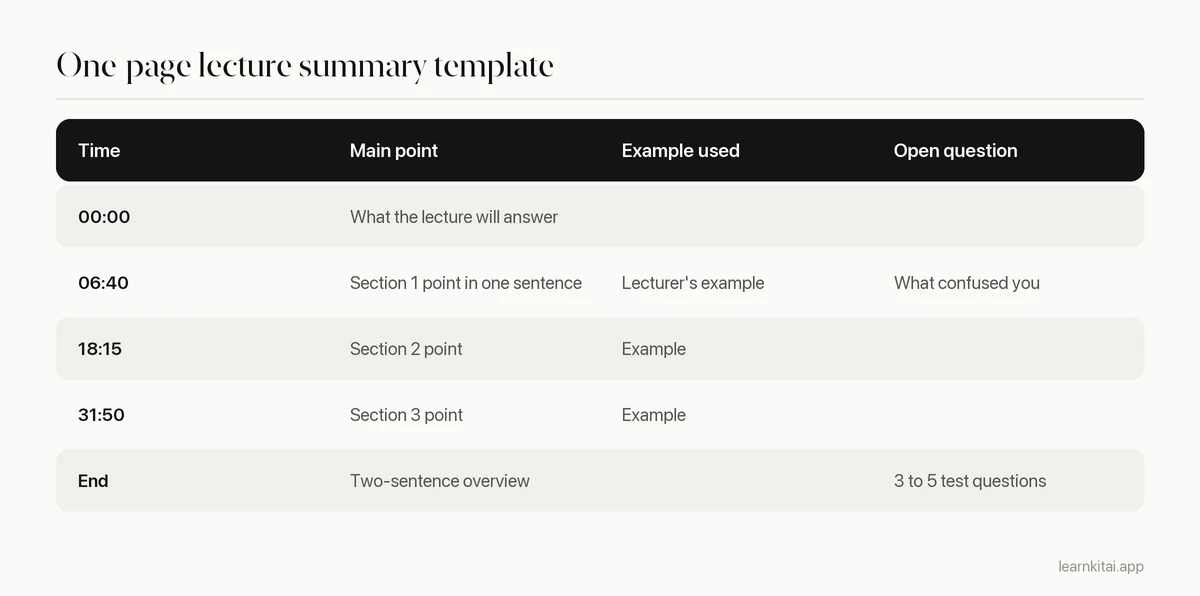
Notice that the open question has its own timestamp. That is the main advantage of video over a live lecture: when something is unclear, you can go back to the exact minute instead of guessing.
How do you summarize a long lecture without losing focus?
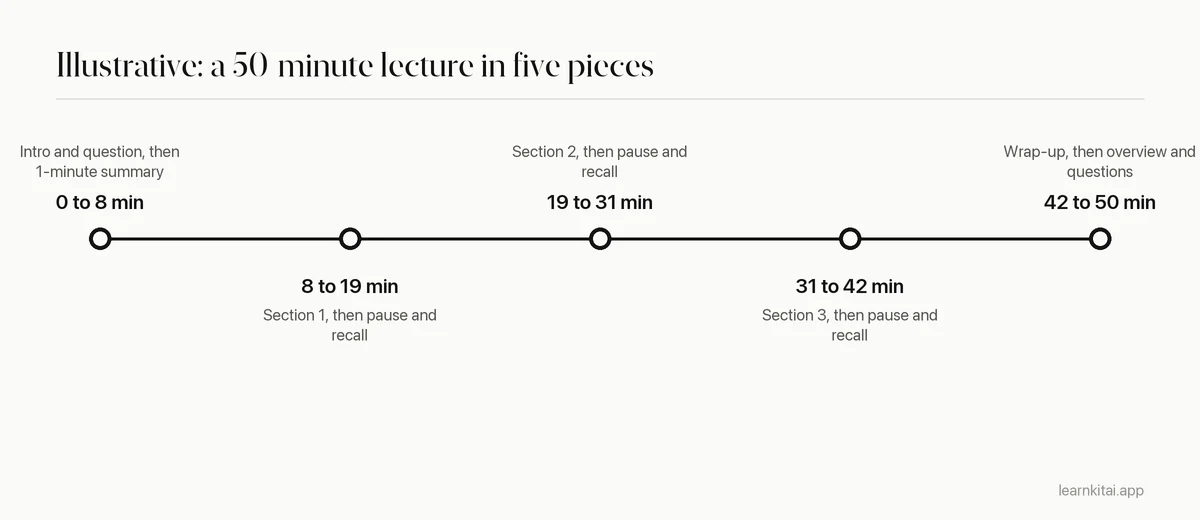
Treat it as several short videos. Research on online course videos found that shorter videos hold attention much better, so watch one section, write its summary, take a short break if you need it, then start the next. Do not try to take continuous notes for an hour.
That research is a study of 6.9 million video sessions on edX, in which Philip Guo and colleagues found that shorter videos are much more engaging. A recorded university lecture is rarely short, but the section-by-section method turns it into a series of short pieces. The pause after each section also gives you the moment of recall that makes the summary stick.
Is it okay to watch lectures at faster speed?
For familiar or slow-paced material, faster playback can save time. For new or dense topics, normal speed gives you room to think. A simple test: if you cannot write a section's main point from memory after watching it, slow down or rewatch that part.
Speed is a tool, not a goal. Many students try to summarize YouTube video lectures at double speed and end up rewatching half of them, which costs more time than it saved. A better pattern is to vary the speed inside one video: faster for the intro, recaps and examples you already know, normal speed for new definitions, derivations and anything on the slide you will need to reproduce. If the lecturer is writing equations by hand, normal speed also gives you time to follow each line instead of copying the final result.
Can AI summarize a YouTube video for you?
Yes. AI tools read the video's transcript and produce a summary in seconds. Quality depends on the transcript, and YouTube itself notes that automatic captions can be wrong because of accents, dialects or background noise. Check technical terms and numbers against the audio.
YouTube's help page on automatic captions says they are generated by machine learning and their quality may vary. A misheard word in a transcript becomes a confident wrong word in the summary. That is why the transcript check in step five matters even when a tool did the summarizing. For a broader checklist, see how to check AI study notes for errors.
LearnKit's Chrome extension opens in a side panel next to a YouTube video and can summarize it, or turn it into flashcards or a quiz, without leaving the page. A good way to use it is after you write your own section notes: compare, and look up anything the AI included that you missed. More tools are reviewed in Chrome extensions for students.
Common mistakes when summarizing lecture videos
- Typing everything the lecturer says, so the summary is as long as the transcript.
- Copying slide text instead of writing what the slide means.
- Skipping timestamps, then scrubbing through the video to find one explanation.
- Trusting caption text for names, numbers and formulas without listening.
- Reading an AI summary instead of watching, then being surprised by exam questions on the examples.
How do you study from a video summary?
Answer the questions at the bottom of your page the next day without looking, then again a few days later. Turn anything you miss into flashcards and rewatch only the timestamp where that idea was explained.
A summary you only reread works like rewatching: it feels familiar and fades fast. Use the questions at the bottom of your page. Answer them the next day without looking, then again a few days later. Turn the ones you miss into cards with the method in flashcards from a YouTube video. If your lectures are recordings from your own course rather than YouTube, lecture recording notes covers the differences, and the general method for any source is in how to summarize a chapter.
Frequently asked questions
Should I take notes during the video or after each section?
Mostly after each section. Jot a few key words while watching so you can follow the argument, then pause and write the full point from memory. Continuous note taking tends to turn into copying the slides.
How long should a summary of a one-hour lecture be?
One page is a good target. A sentence or two per section, an example each, and a short overview at the end is enough to study from. If your notes run to several pages, you are capturing rather than summarizing.
What if the YouTube video has no chapters or transcript?
Use slide changes or the lecturer's spoken signposts to split it into sections. Without a transcript, play dense parts at normal speed and rewatch short stretches to check terms and numbers before you write them down.
Sources
- How Video Production Affects Student Engagement: An Empirical Study of MOOC Videos, ACM Learning at Scale (Guo, Kim and Rubin, 2014) (Analysis of 6.9 million video watching sessions on edX found shorter videos are much more engaging.)
- Use automatic captioning, YouTube Help (Google) (Automatic captions are generated by machine learning and quality may vary.)
- Learning science: Actively recalling information from memory beats elaborate study methods, ScienceDaily (Purdue University release on Karpicke and Blunt, Science, 2011) (200 students; retrieval practice led to about 50% better retention a week later than concept mapping.)
Keep reading
How to Summarize a Chapter So You Never Reread It
Most chapter summaries are just shorter copies of the book. The closed-book method turns summarizing into practice that sticks, so you can study from your page instead of the chapter.
Flashcards From YouTube Video: Pause Less, Recall More
Stop pausing every thirty seconds to type notes. Watch first, then turn the transcript into a small set of cards you can actually test yourself with.
Lecture Recording Notes Without Rewatching It All
A recording is not a second lecture. Use it as a search tool for gaps, and you can turn a 50-minute class into solid notes in a fraction of the time.
Summarize an Article Fast: Read Less, Keep More
Reading every word of a long article is the slow way to summarize it. A three-pass method gets you the main points in a fraction of the time.
Chrome Extensions for Students: Keep 5, Delete the Rest
Most students run too many extensions and use few of them. Here are the five kinds worth keeping, a safety check, and a study-only browser setup.