Notes From Photos of Pages: Scan Less, Learn More
Take flat, well-lit photos of only the pages you need, convert them to text with your phone's text recognition or a study app, and check the text against the page. Then write short notes in your own words and turn the key points into questions, because a photo alone does not help you remember.

Photographing a page takes a second, which is why so many camera rolls are full of textbook pages, whiteboards and borrowed notes that never get looked at again. Making notes from photos of pages is a good idea, but the photo is only step one. This guide covers how to capture pages well, how to pull out the text, and how to turn that text into something you will actually remember.
Does taking a photo of a page help you remember it?
Not by itself. Research on a photo-taking impairment effect found that people remembered fewer objects, and fewer details, when they photographed them than when they simply looked. Paying focused attention removed the effect. The photo saves the page, but your brain may treat that as permission to forget.
In a study published in Psychological Science, Linda Henkel led people on a museum tour and asked them to photograph some objects and only observe others. They later remembered fewer of the photographed objects and fewer details about them. When people zoomed in to photograph a specific part, though, the memory cost disappeared, which suggests that focused attention is what matters.
Pages are not museum objects, but the lesson carries over. A snap of a page feels like progress and is not. The work that builds memory comes after the photo: reading, choosing, writing and testing.
How do you take good photos of pages for notes?
Lay the page flat, use even light without shadows, hold the phone parallel to the page, and fill the frame with the text. Shoot only the pages you need, and one page per photo, so the text recognition has a clean image to work with.
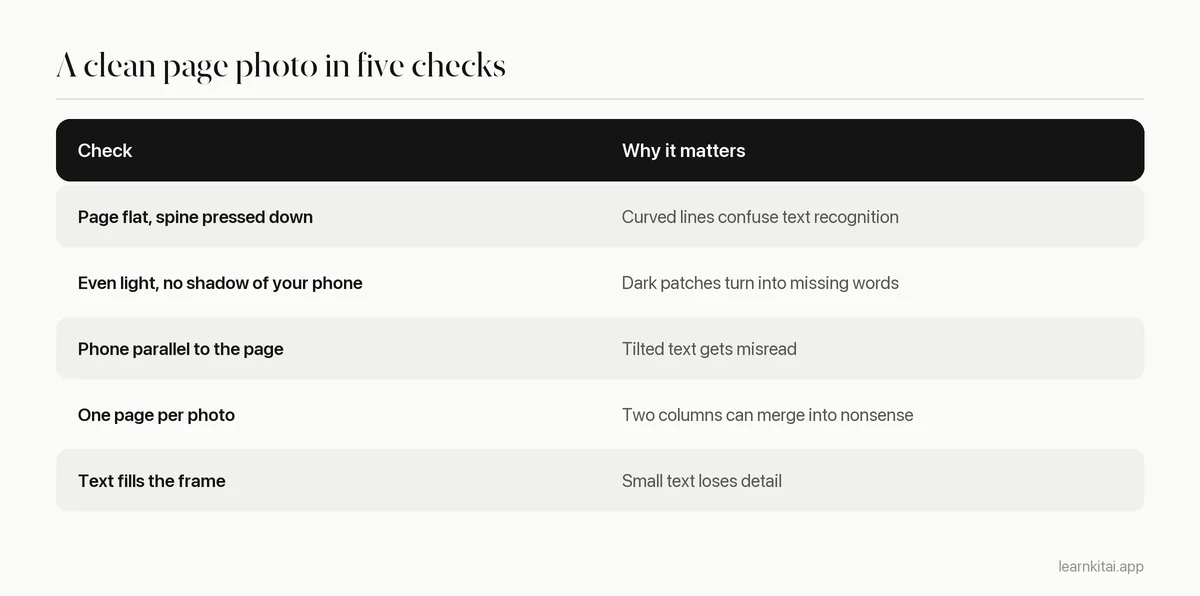
Be selective. If a chapter has 30 pages and the exam covers five topics, photograph the pages that carry those topics, the summary box, and any key diagrams. Fewer photos mean less checking and less clutter later.
How do you turn photos of pages into text?
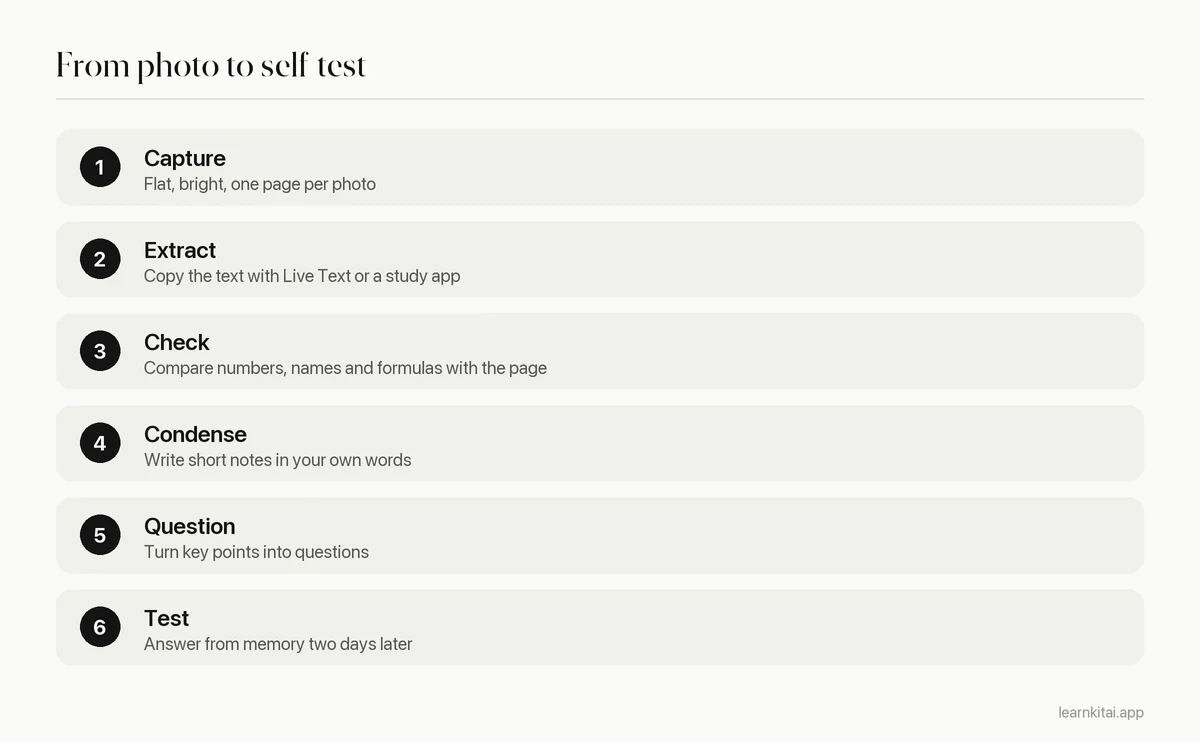
Use text recognition, often called OCR. Recent iPhones can select and copy text from a photo with Live Text, and many study apps read the text for you. Then paste it into a document and fix any errors before you study from it.
On an iPhone, Apple's Live Text works in the Photos app: touch and hold a word, drag to select, and tap Copy, or use Select All to grab everything. It needs an iPhone XS, iPhone XR or later with iOS 15 or later. Android phones offer similar options through the camera or Google Lens.
What errors should you check for in scanned text?
Check numbers, units, names, formulas, and anything in tables or columns. Text recognition can misread similar characters, drop symbols like Greek letters or exponents, and jumble multi-column layouts. A wrong number in your notes is worse than no number at all.
- Look-alike characters. The digit 1 and the letter l, 0 and O, rn and m.
- Math and science symbols. Exponents, subscripts, Greek letters and fraction bars often vanish.
- Columns and tables. Text from two columns may be read straight across, mixing sentences.
- Handwriting. Neat print converts well; fast cursive often does not.
- Hyphenated line breaks. Words split across lines may come out as two fragments.
The same caution applies if an AI tool reads the page and writes a summary for you. It can misread the text and then confidently build on the mistake. Our guide on checking AI study notes for errors has a quick routine for spotting this.
What should notes from photos of pages look like?
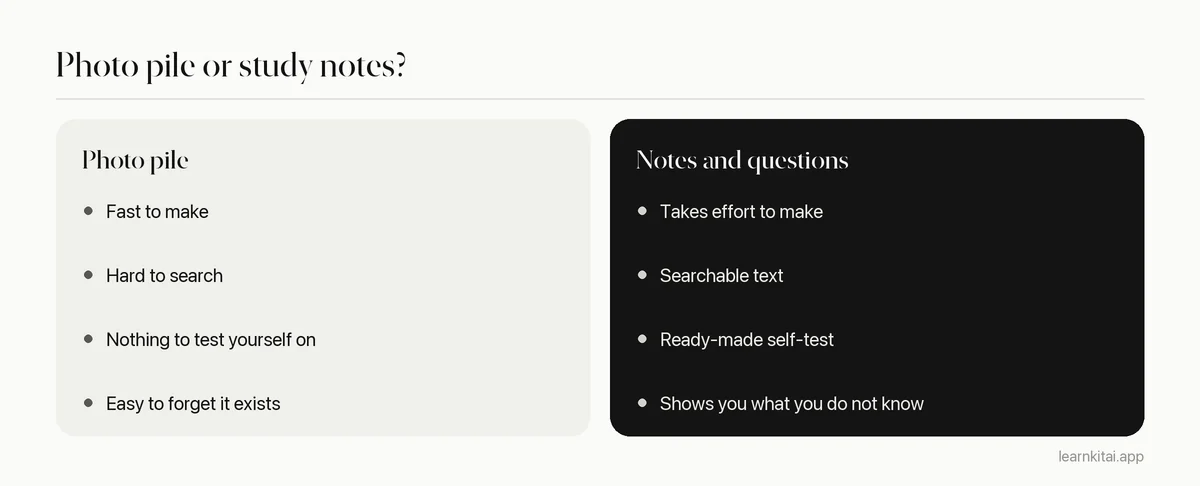
Do not study the raw text. Read it once, then close it and write the main points in your own words. Turn each main point into a question and test yourself later. The text is your source; the notes and questions are what you study.
Raw text from a page is just the page again, in a different format, and the same is true of any long document you study with AI. The steps that help you learn are the ones that make you think: deciding what matters, putting it in your own words, and retrieving it later. In a classic study by Roediger and Karpicke, students who tested themselves on a passage recalled 56% of it a week later, compared with 42% for students who restudied it.
For a full chapter, follow the process in how to summarize a textbook chapter. If you prefer cards, the extracted text works just like a PDF; see making flashcards from a PDF for how to pick what to put on them.
A worked example
Say you borrowed a friend's handwritten chemistry notes for a class you missed. You photograph the four pages, copy the text, and fix the two places where "mol" came out as "mo1". Then you close the text and write five lines from memory: the main idea of each page. You check them, add what you missed, and write four questions, like "Why does increasing temperature speed up a reaction?" Two days later, you answer them without looking. Total time: about twenty minutes, and you now own the material instead of just a photo of it.
The LearnKit iPhone app can scan pages with the camera and make a summary, flashcards or a quiz from them in one step, which saves the copying. Check the result against the page the same way you would check your own extracted text.
Photos are a fine way to collect pages. Just treat them as raw material, and make notes from photos of pages soon after you take them, while you still remember why each page mattered. The learning starts when you close the photo and try to say what it said.
Frequently asked questions
Can I take notes from photos of handwritten notes?
Yes, but expect more errors than with printed text, especially with fast handwriting. Check every number and name, and keep the photo so you can look back at the original.
Is it legal to photograph textbook pages?
Rules depend on your country and how you use the copies. Photographing a few pages for your own study is commonly treated differently from sharing whole books. Do not post or share scanned textbook pages, and check your school's guidance if you are unsure.
Should I photograph the whiteboard in class?
A photo is a good backup for diagrams and long equations. Still write a short note in your own words about what the board shows, because the photo alone will not tell you why it mattered.
What is the best file format for scanned pages?
For studying, a PDF with selectable text is the most useful, because you can search it and paste from it. Many scanner apps create these automatically. Plain photos work too if you extract the text.
Sources
- Point-and-shoot memories: the influence of taking photos on memory for a museum tour, Psychological Science (Henkel, 2014) (Photo-taking impairment effect: fewer objects and details remembered when photographed)
- Copy and translate text from photos on your iPhone or iPad, Apple Support (Live Text requires iPhone XS, iPhone XR or later with iOS 15 or later; select and copy text from photos)
- Test-enhanced learning: taking memory tests improves long-term retention, Psychological Science (Roediger and Karpicke, 2006) (Experiment 1: 56% recall after one week with testing versus 42% with restudying)
Keep reading
How to Summarize a Chapter So You Never Reread It
Most chapter summaries are just shorter copies of the book. The closed-book method turns summarizing into practice that sticks, so you can study from your page instead of the chapter.
Flashcards From PDF: Turn a Chapter Into 30 Good Cards
A PDF chapter can become a focused deck in under an hour, by hand or with AI. Where to look for card material, how to handle scanned files, and how to check the result.
AI Hallucinations in Study Notes: A 10-Minute Error Check
AI notes can sound perfect and still be wrong. Learn where errors hide and a quick routine to catch them before they reach your exam.
Study With PDF Files and AI: Read Less, Recall More
Scrolling and highlighting a long PDF feels productive but fades fast. Here is a five-step AI workflow that turns any PDF into practice.
Summarize PDF Files With AI and Catch What It Gets Wrong
AI can shrink a 60-page PDF in seconds. Here is a workflow that keeps the speed and catches the errors before they end up in your notes.