Summarize PDF Files With AI and Catch What It Gets Wrong
To summarize a PDF with AI, first confirm the file contains selectable text, split long documents by chapter, and tell the tool what you need the summary for. Then spot-check numbers, names and claims against the original pages, and turn the summary into questions. AI summaries save time but can contain errors, especially on long files.
You have a 60-page PDF due for Thursday's seminar and two other readings on top. Using an AI tool to summarize PDF readings is the obvious move, and often a good one. The risk is that you study a confident summary that quietly gets a number wrong, flips a finding, or skips the section your professor cares about. This guide gives you a workflow that keeps the speed of AI and adds the few checks that catch its mistakes, so the summary you study from is one you can trust.
Can AI summarize a PDF accurately?
Often, but not reliably enough to skip checking. A 2023 study of large language models summarizing medical evidence found they could produce factually inconsistent summaries, struggled to pick out the most important information, and made more errors on longer texts.
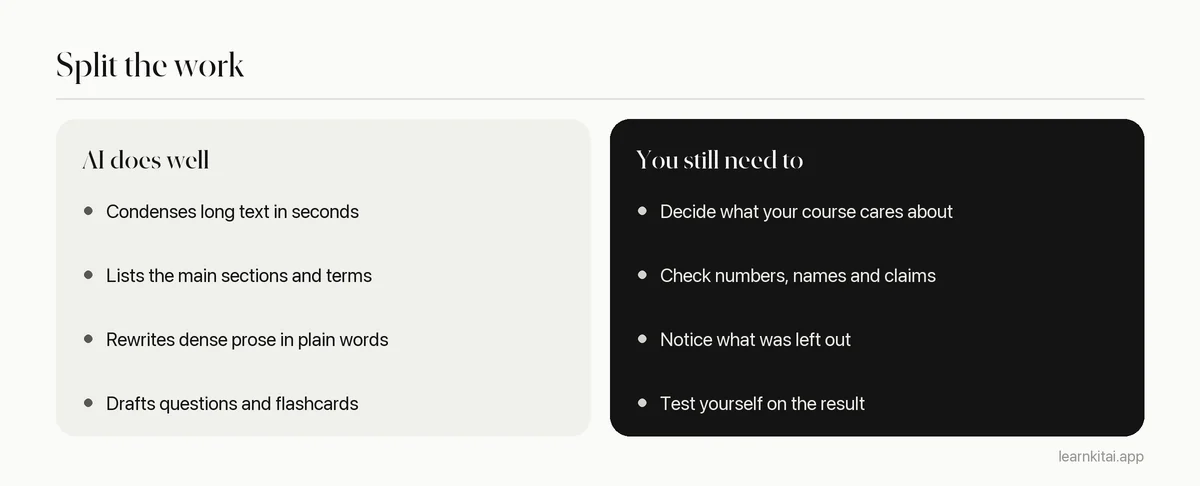
That study, by Liyan Tang and colleagues in npj Digital Medicine, tested models available at the time on summaries of clinical research. Newer models are better, but the three weak spots they found still describe where AI summaries tend to go wrong: invented or distorted details, missing the key point, and trouble with long documents. Those weak spots tell you exactly where to look when you check.
How to summarize PDF files with AI in five steps
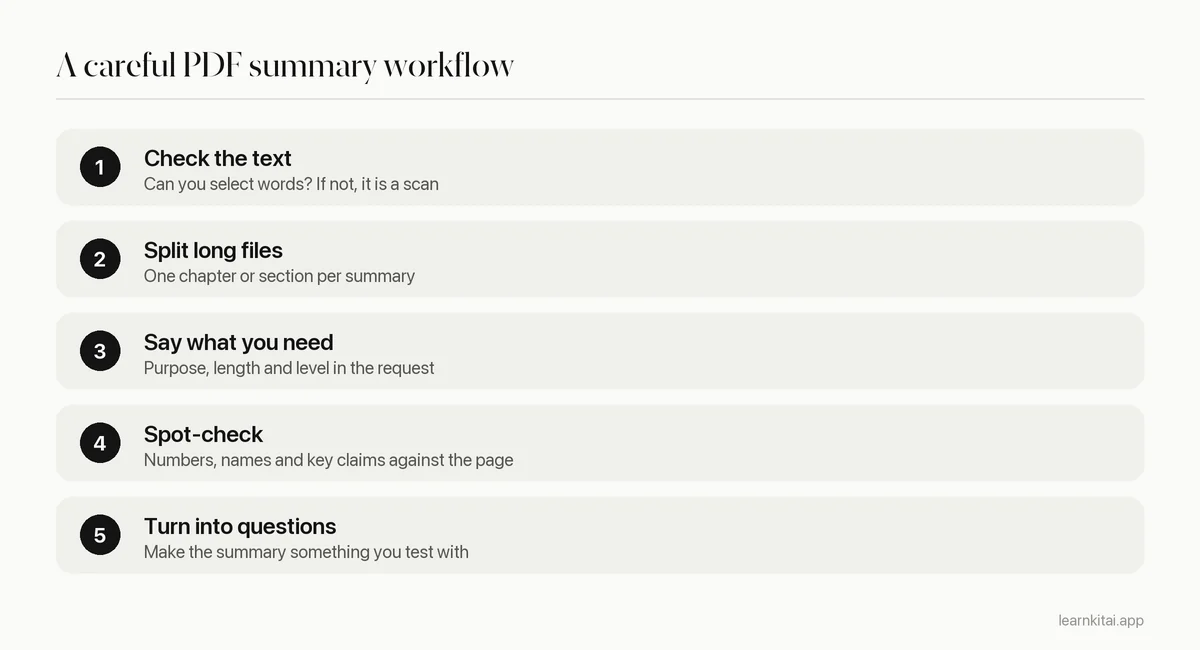
1. Check that the PDF has real text
Try to select a sentence in the PDF. If you can highlight individual words, the file has a text layer and any summarizer can read it. If the whole page highlights as one image, it is a scan, and the tool has to run text recognition first. Recognition errors in old scans, formulas and tables are common, so check those summaries more carefully. Our guide to notes from scanned pages covers this case.
2. Split long documents
Long inputs are where summaries get weakest. Instead of feeding a whole 300-page book, summarize one chapter or one major section at a time. You get more detail per section, and it is much easier to check a summary against 20 pages than against 300.
3. Tell the tool what you need
A summary for a seminar discussion is different from one for a multiple choice exam. Add one line of purpose. Some examples you can adapt:
- Summarize this chapter for an intro psychology exam. List key terms with one-line definitions.
- Summarize the main argument of this reading and the two strongest pieces of evidence for it.
- Summarize each section in two sentences, keeping the section headings.
- List the steps of every process described, in order.
Length matters too. A short summary is good for deciding whether a reading is worth your time, or for a quick refresh before class. A section-by-section summary is better for studying, because it keeps the structure of the original and makes checking easy. If the tool only gives you one paragraph for a long chapter, ask again section by section. You will notice that short summaries mostly drop examples and evidence, which are exactly what essay questions and seminar discussions ask about.
Finally, read the opening and closing pages of the PDF yourself before you read any summary. Authors usually state their main point in those places. If the AI summary's main point does not match what you read there, that is your first warning sign.
What should you check in an AI summary?
Check the details that are easy to distort and costly to get wrong: numbers, names, dates, the direction of findings, and words like not or only. Also compare the summary's section list with the PDF's headings to see if anything important was skipped.
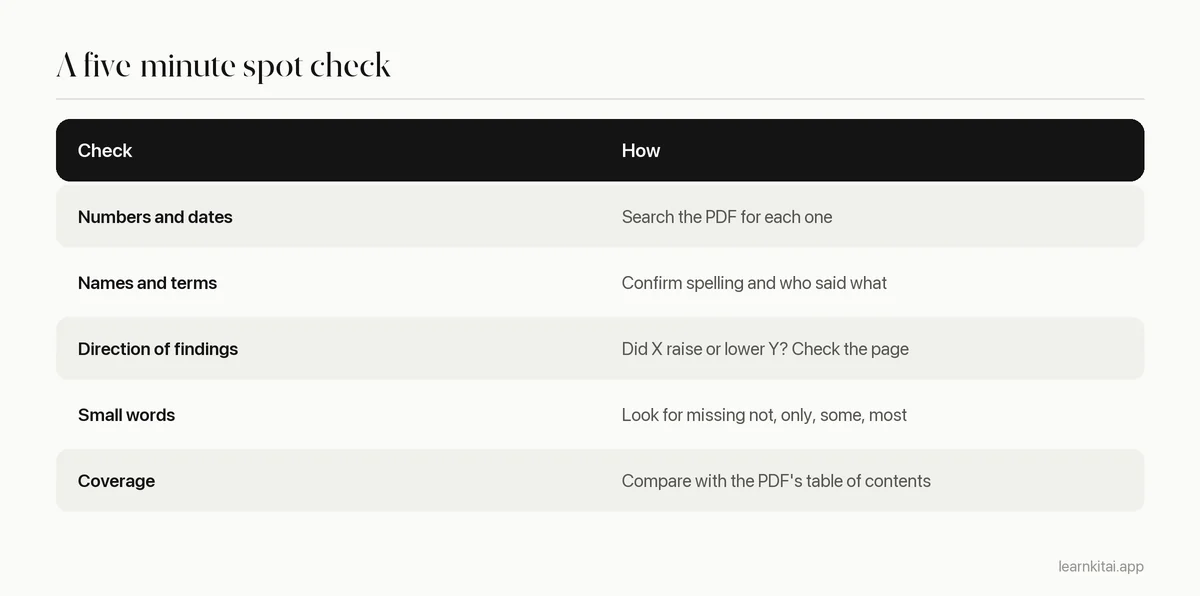
Use your PDF reader's search to jump straight to each number or name. Five checks per chapter is usually enough to tell you whether a summary is trustworthy. If two of them are wrong, read that chapter yourself. For a deeper method, see how to check AI study notes for errors.
Should you ask AI for citations from a PDF?
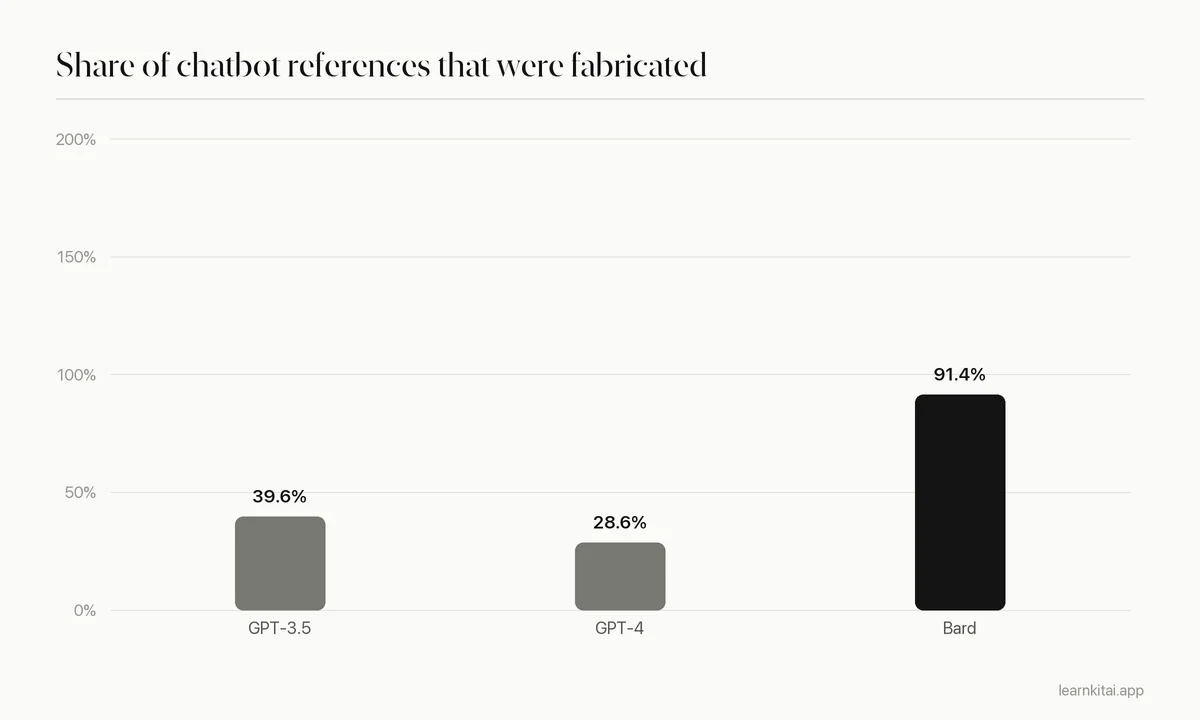
Only for references that appear in the PDF itself, and verify each one. When asked to find sources on their own, AI chatbots have invented references. In one 2024 test, 28.6% to 91.4% of the references different chatbots produced were fabricated.
That figure comes from Chelli and colleagues in the Journal of Medical Internet Research, who asked chatbots to find papers for systematic reviews. The models tested have since been updated, but the lesson holds. A summary of the PDF you gave the tool is grounded in that text. A list of sources the tool comes up with on its own is not. If you need references, take them from the PDF's own bibliography.
Is it cheating to summarize PDF readings with AI?
Using AI to understand a reading is usually fine, but rules vary by course, so check your syllabus. Submitting an AI summary as your own work, or using AI where an assignment forbids it, is a different matter. When in doubt, ask your instructor.
A useful line to draw: AI that helps you read is a study aid, AI that writes what you hand in is an authorship question. Our article on AI and academic integrity goes through the common policies and gray areas.
How do you study from the summary?
Do not just reread it. Turn each section into two or three questions, quiz yourself the same day, and review again after a few days. A summary is most useful as an answer key you test yourself against, not as a shorter thing to reread.
This is where AI saves the most time. LearnKit can take the same PDF and produce a summary, flashcards or a short quiz, so you can go straight from reading to testing yourself. Try the free AI summarizer with one chapter, then check it with the table above. For a fuller study routine with PDFs, see study a PDF with AI and flashcards from a PDF.
AI makes the reading pile smaller, but it does not do the remembering for you. Summarize one section at a time, check the risky details, and test yourself on what you kept. For the method that works with or without AI, read the main guide on how to summarize a chapter.
Frequently asked questions
Can AI summarize a scanned PDF?
Many tools can, by running text recognition on the page images first. Quality depends on the scan. Clean printed pages work well, while handwriting, faint copies, formulas and tables often contain recognition errors you should check.
How long can a PDF be for an AI summary?
Limits differ by tool and plan, and some quietly read only part of a long file. Even when a tool accepts a whole book, summaries of shorter sections are more detailed and easier to verify, so split long files by chapter.
Will an AI summary be enough to pass an exam?
Rarely on its own. Summaries leave out examples and details that exam questions often use. Treat the summary as a map of the reading, then test yourself and go back to the PDF for the parts you cannot answer.
Sources
- Evaluating large language models on medical evidence summarization, npj Digital Medicine (Tang et al., 2023), PubMed Central (LLMs could generate factually inconsistent summaries, struggled to identify salient information, and were more error-prone on longer texts.)
- Hallucination Rates and Reference Accuracy of ChatGPT and Bard for Systematic Reviews: Comparative Analysis, Journal of Medical Internet Research (Chelli et al., 2024) (Fabricated reference rates of 39.6% (GPT-3.5), 28.6% (GPT-4) and 91.4% (Bard).)
Keep reading
How to Summarize a Chapter So You Never Reread It
Most chapter summaries are just shorter copies of the book. The closed-book method turns summarizing into practice that sticks, so you can study from your page instead of the chapter.
Study With PDF Files and AI: Read Less, Recall More
Scrolling and highlighting a long PDF feels productive but fades fast. Here is a five-step AI workflow that turns any PDF into practice.
Flashcards From PDF: Turn a Chapter Into 30 Good Cards
A PDF chapter can become a focused deck in under an hour, by hand or with AI. Where to look for card material, how to handle scanned files, and how to check the result.
AI Hallucinations in Study Notes: A 10-Minute Error Check
AI notes can sound perfect and still be wrong. Learn where errors hide and a quick routine to catch them before they reach your exam.
AI Summarizer Accuracy: What Gets Lost, and How to Check
AI summaries are fluent and fast, and usually mostly right. Here is where they slip, and a five-minute check before you study from one.