Study With PDF Files and AI: Read Less, Recall More
To study with a PDF and AI, skim its structure yourself first, then have AI summarize each section and turn it into questions. Answer those questions from memory, check the PDF for anything you missed, and review the weak spots over the next week. The AI builds the practice; you do the recalling.
A 60-page lecture PDF lands in your inbox on Monday. By Thursday you have scrolled through it twice, highlighted half of it yellow, and still could not explain the main idea of chapter three. You are not lazy. You are using a method that feels like learning but mostly is not. The way to study with PDF files in the age of AI is to stop reading them more and start testing yourself on them sooner.
This guide gives you a five-step workflow, tells you what to ask AI to make from different kinds of PDFs, and ends with a simple one-week review plan.
Why does rereading a PDF feel like learning?
Because the text gets familiar. Recognizing words on a page feels like knowing them, but recognition is not recall. Exams ask you to produce answers, and only practice at producing them builds that skill.
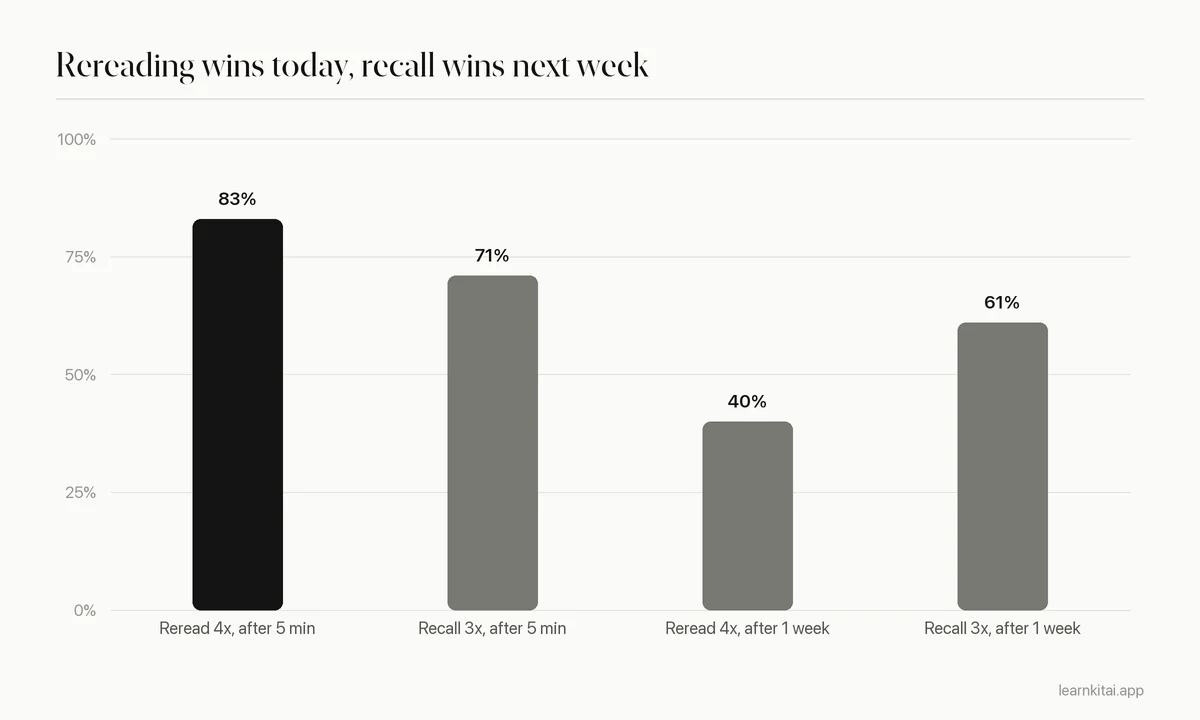
Psychologists call this a fluency illusion. The second time you read a page, it flows more easily, and your brain treats that ease as a sign of learning. A classic experiment by Roediger and Karpicke shows the trap. Students either read a passage four times or read it once and then tried to recall it three times. Five minutes later, the rereaders did better. One week later, the result flipped: the students who practiced recall remembered 61% versus 40% for the rereaders.
A large review by Dunlosky and colleagues reached the same conclusion across many studies. It rated practice testing and spaced practice as the most useful techniques, and rated highlighting and rereading as low utility. If you want the full story, read why rereading does not work.
How do you study with PDF files using AI?
Skim the PDF's headings yourself, split it into sections, have AI summarize each section, then generate questions and answer them without looking. Check your answers against the PDF and save what you missed for spaced review.
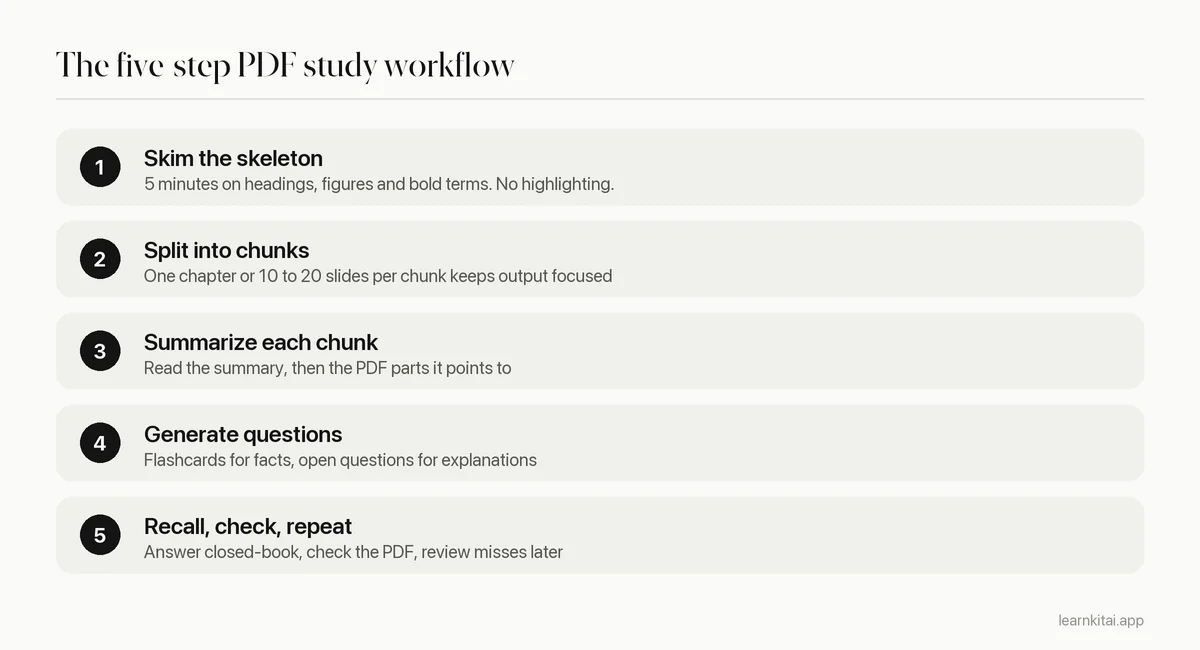
Step one is yours alone. Spending five minutes on the structure gives you a mental map, so the AI summary has somewhere to land. Step two matters more than it seems: a whole 200-page PDF summarized in one go loses detail, while a 15-page chunk keeps it. Our guide to summarizing a PDF with AI goes deeper on getting good summaries.
Steps four and five are where the learning happens. Close the PDF. Answer each question in your head or on paper before you flip the card or reveal the answer. Getting it wrong is useful: it shows you exactly which page to go back to.
What should you ask AI to make from each kind of PDF?
Match the output to the material. Slides with many terms suit flashcards. Textbook chapters suit a summary plus open questions. Research papers suit a structured summary. Problem sets suit worked examples and a short quiz.
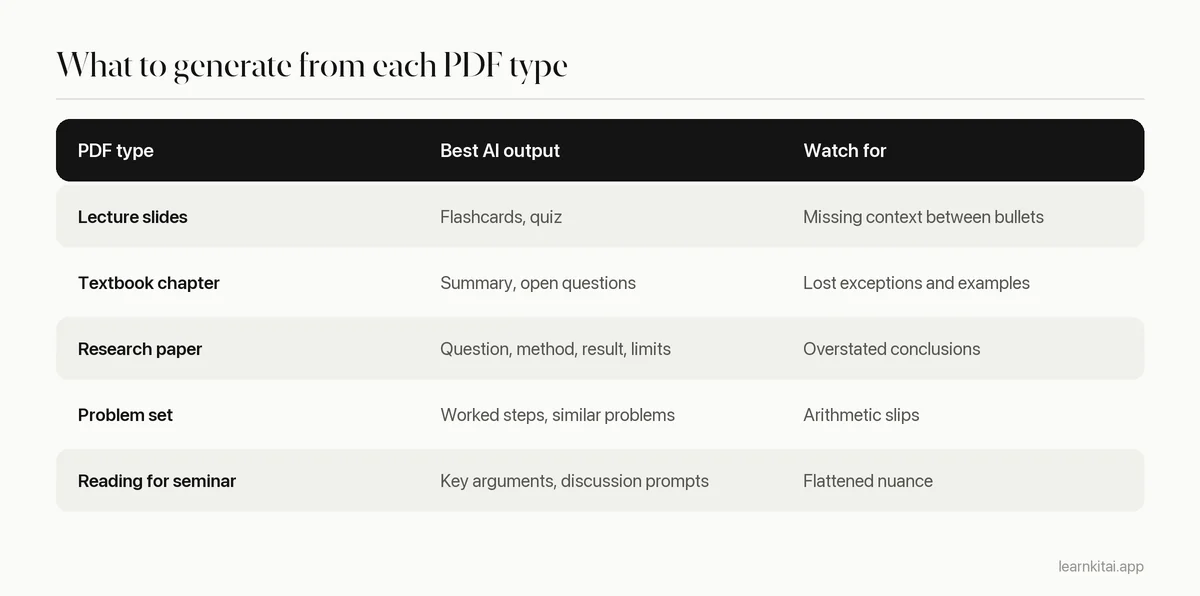
For slide decks, flashcards are usually the fastest win. See flashcards from a PDF for how to keep cards short and testable. For papers, ask for the research question, the method, the main result and the limits as four separate parts, which mirrors how a research paper summary should look.
A worked example
Take a 40-page chapter on cellular respiration. You skim it and see four parts: glycolysis, the link reaction, the Krebs cycle and the electron transport chain. You make four chunks. For each, you read the AI summary, then ask for five flashcards and two open questions. That is 20 cards and 8 questions. You answer them closed-book and miss six cards, mostly on where each stage happens and how many ATP it yields. Those six cards go into tomorrow's review. Total time: about an hour, and you now know exactly what you do not know.
LearnKit is built for this loop. You add the PDF, and it gives you a summary, flashcards, a multiple choice quiz or open questions with sample answers from that same file.
How should you review a PDF over a week?
Do one focused session, then short reviews on day 1, day 3 and day 7. Each review starts with recall, not rereading: answer the questions first and reopen the PDF only for what you missed.
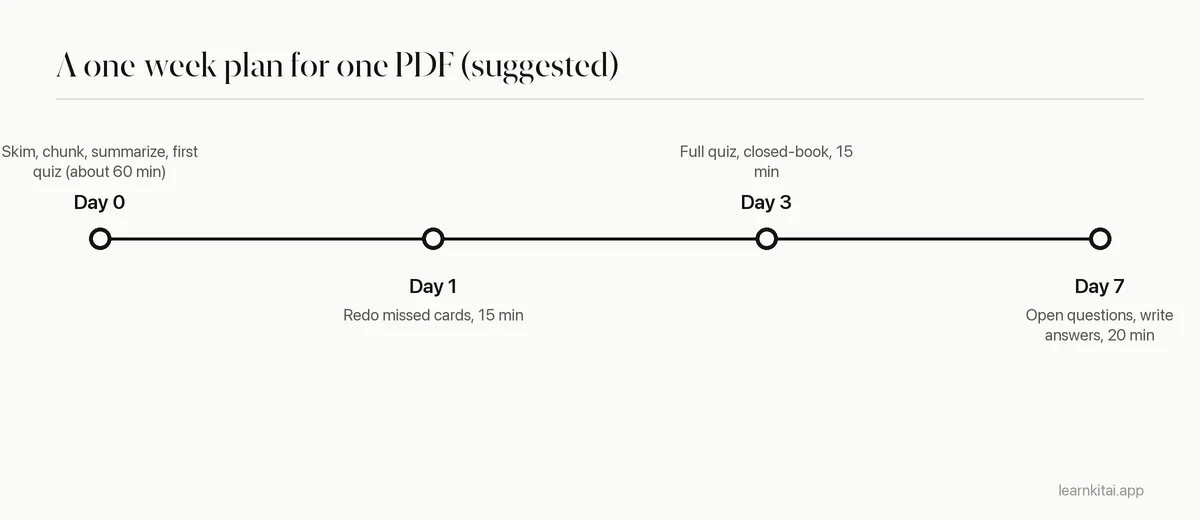
The gaps grow on purpose. Each time you recall something after a bit of forgetting, the memory gets stronger. That is the idea behind spaced repetition, and it pairs perfectly with AI-generated questions because you never run out of things to test.
Is chatting with a PDF a good way to study?
It is good for clearing up confusion, not for remembering. Asking a PDF chatbot questions is still passive if the AI does the answering. Flip it: ask the AI to question you, and answer before you read its reply.
Chat-with-PDF tools are handy when a paragraph makes no sense or you want an example the author skipped. Use them like a tutor sitting next to you. But notice who is doing the work. When you ask and the AI answers, you read. When the AI asks and you answer, you recall. Only the second builds the memory you need on exam day.
A simple rule helps you study with PDF chatbots well: for every question you ask the AI, have it ask you two. Try a prompt like "Using only this PDF, ask me three questions about section 2, one at a time, and wait for my answer before giving feedback." Now the chat works as a quiz, and the source keeps the questions tied to your course.
Common mistakes when studying from PDFs
- Summarizing the whole PDF at once. You get a thin overview. Chunk it.
- Reading the summary instead of the PDF. A summary is a map, not the territory. Use it to decide where to look.
- Skipping the closed-book step. Reading a question and its answer together is just rereading in a new format.
- Never checking the AI. Spot-check numbers and terms against the page, especially in scanned files.
- One long session. Three short reviews across a week beat one long night.
PDFs are not the problem. Passive reading is. Let AI do the slow part, turning pages into questions, and save your effort for answering them. For more ways to fit AI into your routine, see how to use AI to study.
Frequently asked questions
Can AI read a PDF that is a scan or a photo?
Many tools can, by first converting the image to text. Quality depends on the scan. Check a few terms and numbers in the output against the page before you study from it.
Is it better to print a PDF or study on screen?
The format matters less than the method. Either way, the gains come from recalling the material, not from how you read it. If screens distract you, print the questions, not the whole PDF.
How many flashcards should I make from one chapter?
Aim for cards on the ideas you will be tested on, not every sentence. Around 15 to 30 cards for a typical chapter is a manageable start; add more for the parts you keep missing.
Should I still take my own notes if AI makes a summary?
Short notes in your own words still help, especially for explanations. Use the AI summary as a scaffold, then write a few lines per section from memory. That writing is a form of recall.
Sources
- Test-enhanced learning: Taking memory tests improves long-term retention, Roediger and Karpicke, Psychological Science, 2006 (Experiment 2: after one week, repeated testing 61% vs repeated study 40%; after 5 minutes, 83% (study) vs 71% (test).)
- Which study strategies make the grade?, Association for Psychological Science (Dunlosky et al. review of 10 techniques: practice testing and distributed practice rated high; highlighting and rereading low.)
Keep reading
AI for Studying: Make It Quiz You, Not Think for You
AI can make you a stronger student or a more dependent one. The difference is whether it does the thinking or makes you do it.
Summarize PDF Files With AI and Catch What It Gets Wrong
AI can shrink a 60-page PDF in seconds. Here is a workflow that keeps the speed and catches the errors before they end up in your notes.
Flashcards From PDF: Turn a Chapter Into 30 Good Cards
A PDF chapter can become a focused deck in under an hour, by hand or with AI. Where to look for card material, how to handle scanned files, and how to check the result.
Rereading Notes Feels Like Studying. It Mostly Isn't
Rereading is the most popular study habit and one of the weakest. Here is why it fools you, and a 20-minute swap that works better.
Spaced Repetition: Why Forgetting Is Part of the Plan
Reviewing right before you forget builds memories that last. Learn how long the gaps should be, with a ready schedule for exams one week to one semester away.