Paper vs Digital Flashcards: Why the Format Matters Less
Studies comparing paper and digital flashcards mostly find similar learning when students use them the same way. Paper is easier for drawing and keeps you off your phone; apps handle spacing automatically and are faster to build. Choose the format you will review consistently, and answer every card before you flip it.
The paper vs digital flashcards debate gets heated online. One side says writing by hand makes cards stick. The other says apps are smarter and save hours. When researchers actually compare the two, the result is usually closer to a draw than either side expects. The format matters less than how you use it.
Below is what the studies found, where each format genuinely has an edge, and a decision guide to pick the right one for your course.
Are paper flashcards better than digital ones?
Not reliably. In controlled studies, students learned about equally well from paper cards and from phones or tablets. One study found computer flashcards did worse, while paper and tablet tied. Use matters more than medium.
Three studies give a fair picture. In a 2019 study by Sage, Krebs and Grove, college students learned vocabulary from paper, computer or tablet cards. They learned equally well from paper and tablet, but less well from computer flashcards, and they felt more satisfied with paper than with either digital set.
A follow-up by Sage and colleagues in 2020 compared paper, laptop and smartphone cards and found equivalent learning across all three. The only difference: students spent longer reviewing paper cards. And in a 12-week study with 52 university students learning English in Japan, both a paper group and a Quizlet group improved, with no significant difference in gains, although students rated the digital tools more favorably.
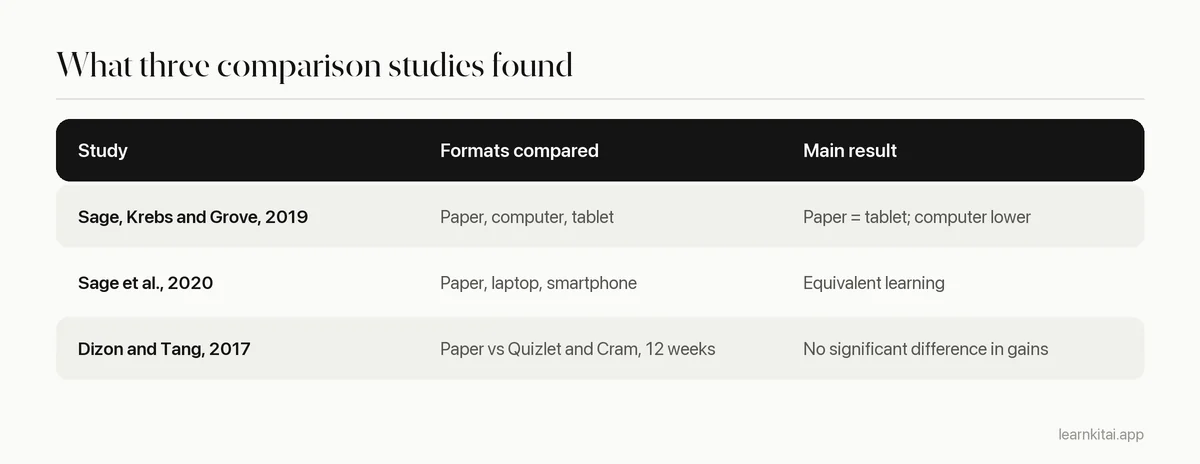
None of these studies is huge, and they focus mostly on vocabulary. But they point the same way: there is no strong evidence that one format beats the other for learning when the cards and the study method are the same.
Where does each format actually win?
Paper wins for drawing, for distraction-free sessions and for the extra thinking that comes from writing each card. Digital wins for automatic spacing, speed of creation, images and audio, and carrying a large deck everywhere.
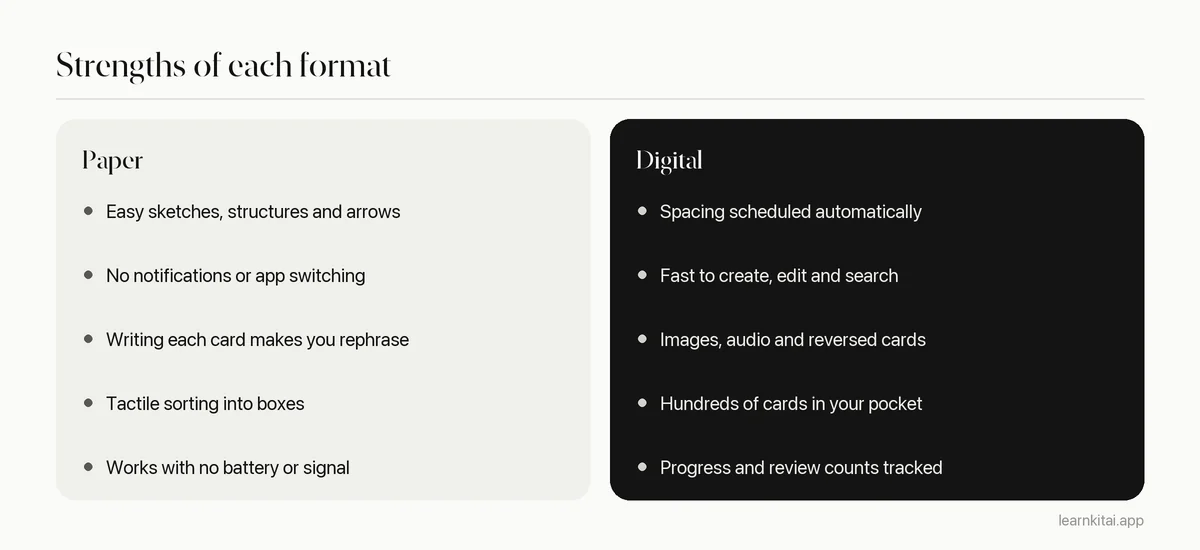
The biggest practical difference is scheduling. Spacing reviews out is one of the strongest findings in learning research. With paper, you have to run the schedule yourself, usually with the Leitner system. With an app, it happens in the background. If you know you will not maintain boxes, that alone can decide it.
The biggest risk of digital is your phone. A flashcard app sits one swipe away from messages and social feeds. If you lose 15 minutes every time you open the deck, paper may be the better tool for you, regardless of what studies say. Our guide to phone distraction while studying has fixes if you want to stay digital.
Does writing flashcards by hand help you remember?
Writing a card makes you process the idea once, which helps a little, but typing a card in your own words does much the same. What matters is rephrasing rather than copying, and then testing yourself on the card later.
Making cards is not where most of the learning happens. In the 2019 Sage study, students actually recalled more words from ready-made cards than from cards they made themselves. Creation helps if it forces you to understand and rephrase; it does not replace the reviews. Whatever the format, follow the writing rules in our guide on how to make flashcards.
Paper vs digital flashcards: which should you choose?
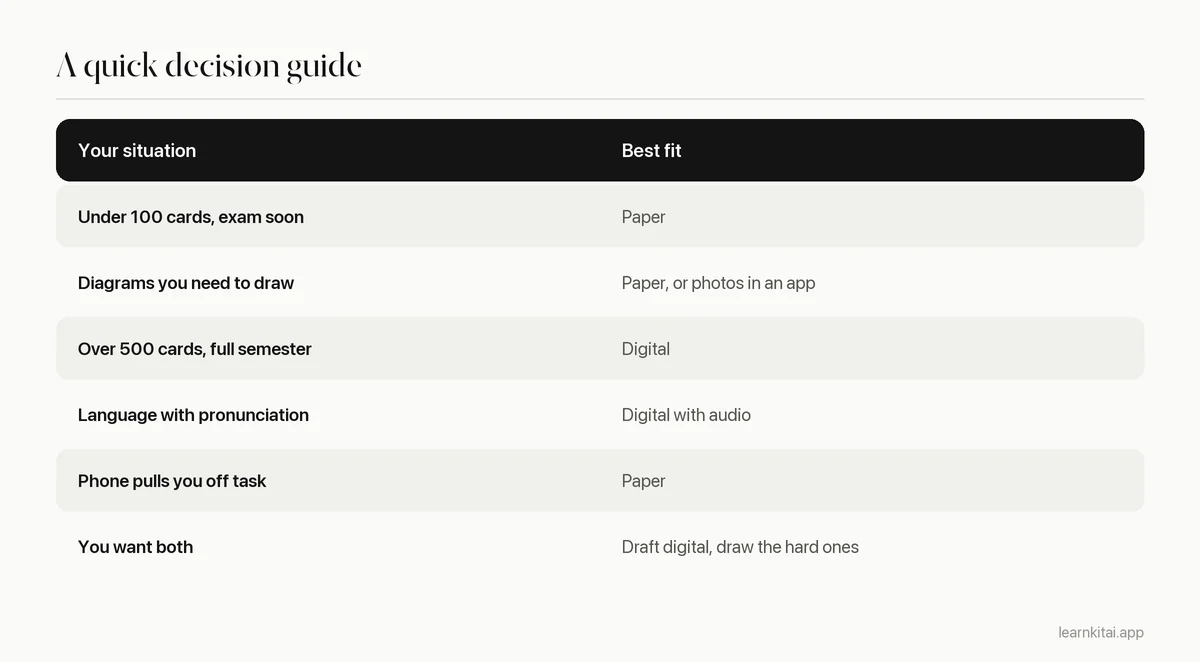
Pick paper for small, visual or short-term decks and if your phone distracts you. Pick digital for large decks, long courses, languages with audio, and if you will not keep a manual schedule. Many students do best with a mix.
The hybrid approach
You do not have to choose one forever. A common pattern is to keep the main deck in an app for spacing, then hand-write a small paper stack of the 20 cards you keep missing. Carry that stack for a week, drill it, and move the cards back to the app once they stick. For anatomy and other visual subjects, sketching structures by hand while using an app for labels works well; see image flashcards for anatomy.
How can you test which format works for you?
Run a two-week trial. Split one topic into two equal halves, study one half on paper and one in an app with the same daily time, then take a short test on both halves a week later. Your own score settles the question.
Research averages hide individual differences, so your own data is worth more than any forum argument about paper vs digital flashcards. A fair trial takes little extra effort if you set it up carefully.
- Pick one topic with about 60 facts, such as a vocabulary unit or a set of anatomy terms, and split it into two equal halves of similar difficulty.
- Make 30 cards on paper and 30 in an app, following the same writing rules for both.
- Study each half for the same number of minutes a day for one week, answering before every flip.
- Stop for three or four days, then write a quick test of ten items from each half without looking at either deck.
- Compare scores and notice how the sessions felt. If scores are close, choose the format you were more willing to open each day.
In the studies above, average scores were close across formats, so for many students the deciding factor will be habit. That is useful information in itself: it frees you to choose based on convenience, cost and distraction instead of worrying that you picked the wrong medium.
One more factor applies to both: how many cards you add. A huge deck in either format becomes a chore. Keep the daily load in check with the method in how many flashcards per day, and the format question mostly answers itself.
Frequently asked questions
Are flashcard apps worth paying for?
Only if a paid feature solves a real problem for you, such as longer decks, better scheduling or creating cards from your materials. The learning comes from honest recall and spacing, which free tools and paper can both provide.
Do index cards work for medical school?
They can for small topics, but medical courses often produce thousands of cards. At that scale, most students find manual scheduling hard to sustain and move to an app, keeping paper for diagrams and high-yield lists.
Is it bad to study flashcards on a laptop?
One study found computer flashcards produced less learning than paper or tablet cards, and students felt less in control. A later study found laptops equivalent. If you use a laptop, close other tabs and answer before revealing each card.
How do I move paper flashcards into an app?
Photograph or type the cards you still miss, not the whole stack. Cards you already know well do not need to move. This is also a good moment to split overloaded cards into smaller ones.
Sources
- Flip, Slide, or Swipe? Learning Outcomes from Paper, Computer, and Tablet Flashcards, Technology, Knowledge and Learning (Sage, Krebs and Grove, 2019) (Paper and tablet equal, computer lower; more satisfaction with paper; more words recalled from ready-made cards.)
- Flip It or Click It: Equivalent Learning of Vocabulary From Paper, Laptop, and Smartphone Flashcards, Journal of Educational Technology Systems (Sage, Piazzini, Downey and Ewing, 2020) (Equivalent learning across paper, laptop and smartphone; longer time spent on paper.)
- Comparing the efficacy of digital flashcards versus paper flashcards to improve receptive and productive L2 vocabulary, The EuroCALL Review (Dizon and Tang, 2017) (52 students over 12 weeks; both groups improved with no significant difference; digital rated more favorably.)
Keep reading
How to Make Flashcards That Still Work Three Weeks Later
Most flashcards fail before you ever study them, because of how they are written. Seven rules, real before and after cards, and a study routine that keeps them working.
The Leitner System: Five Boxes That Schedule Your Reviews
A shoebox, some dividers and one simple rule give you spaced repetition without an app. Here is a ready-to-use five-box schedule and how to adapt it to your exam date.
How Many Flashcards per Day? Count Reviews, Not Cards
The right number of new flashcards depends on the reviews they create later. A simple formula, a budget table and the warning signs that you are adding too many.
Anatomy Flashcards: Hide the Label, Not the Picture
Anatomy exams ask you to name what you see. Image occlusion cards train exactly that, and one good diagram can feed a dozen of them.
Vocabulary Flashcards That Survive Real Conversations
Most word cards train recognition and stop there. Here is how to build vocabulary flashcards that let you actually say the word when you need it.