AI for Studying: Make It Quiz You, Not Think for You
Use AI for studying as a question machine, not an answer machine. Have it turn your notes into quizzes, flashcards and open questions, then answer them yourself before checking. Ask it to explain ideas you got wrong, verify facts against your course material, and never let it solve graded work you are supposed to learn from.
AI for studying has gone from novelty to normal in about two years. A Pew Research Center survey found that 26 percent of US teens had used ChatGPT for schoolwork, double the 13 percent from a year earlier. The question is no longer whether students use AI. It is whether they use it in a way that leaves them knowing more.
The research so far gives a clear pattern. When AI does the thinking, you perform better in the moment and worse later. When AI makes you think, by asking questions, giving hints and checking your answers, it can be a strong learning tool. This guide shows you how to stay on the right side of that line, with workflows for summaries, flashcards, quizzes and tutoring, plus the traps to avoid.
Does using AI for studying help or hurt learning?
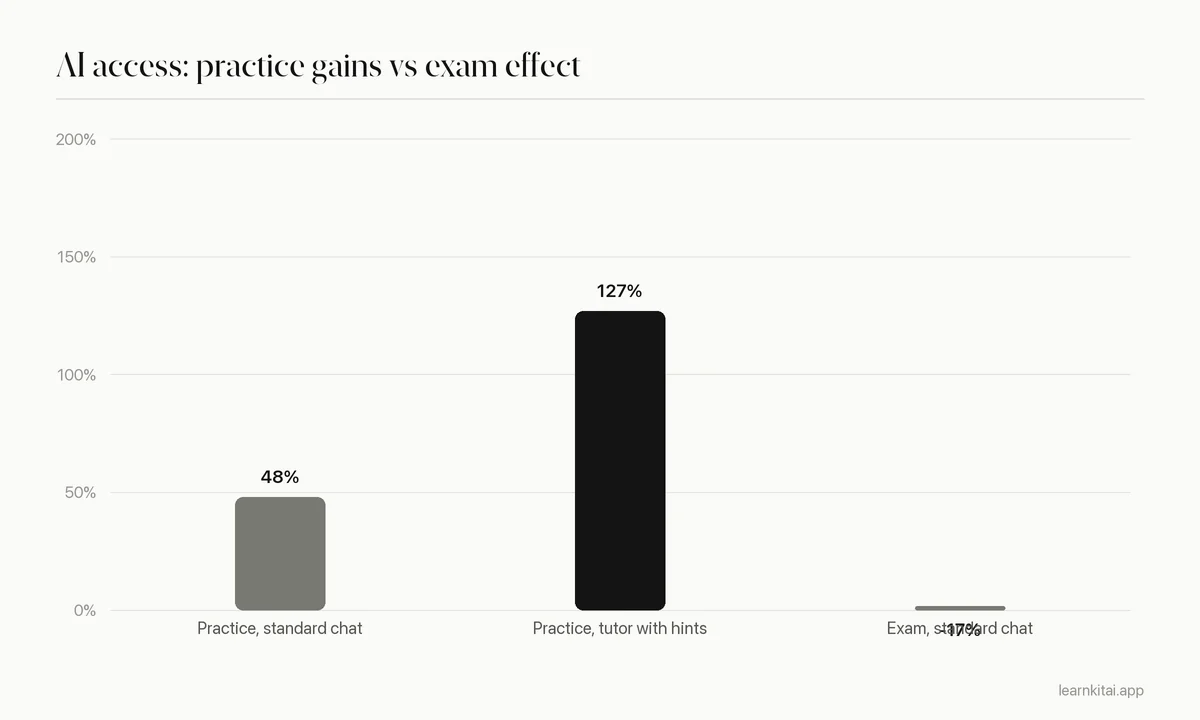
Both, depending on design. In a field experiment with nearly 1,000 high school students, open ChatGPT access raised practice scores by 48 percent but lowered later exam scores by 17 percent. A tutor version that gave hints instead of answers raised practice scores by 127 percent without that harm.
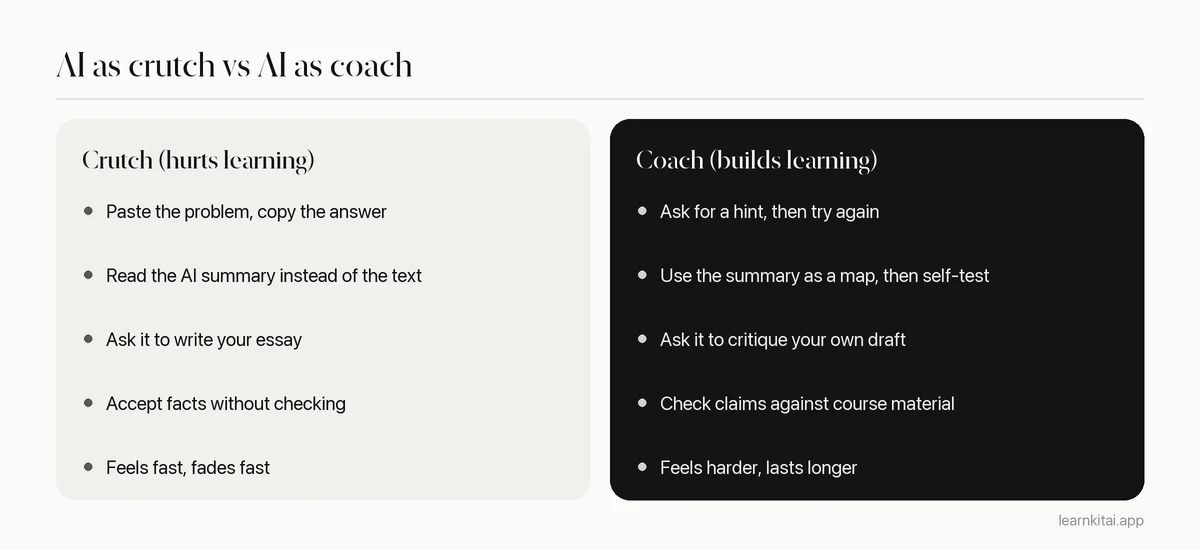
That experiment, by researchers at the University of Pennsylvania and published in PNAS, is the clearest warning so far. Students with a standard chat interface used it as a crutch: they asked for answers, copied them, and did not build the skill. When the AI was taken away for the exam, they did worse than students who never had it. Students with the guarded tutor, which was prompted to give hints and not full solutions, did not show the drop.
The positive side is real too. In a randomized trial with 194 Harvard physics students, a custom AI tutor built on good teaching principles produced median learning gains more than double those of an active learning class, in less time. The tutor walked students through problems step by step instead of handing over answers.
Put the two studies side by side and the rule is simple: AI helps when it makes you do the retrieval and reasoning, and hurts when it does them for you.
What is the best way to use AI for studying?
Use it to generate practice and feedback, not finished work. Turn your notes into questions, quiz yourself, then ask AI to explain what you got wrong. This mirrors practice testing, which learning scientists rate among the most effective study techniques, and keeps your brain doing the work.
A major review of ten study techniques by Dunlosky and colleagues rated practice testing and spaced practice as high utility, and rated rereading, highlighting and summarizing as low utility. That ranking is a map for using AI. The low-value habits, reading a summary or rereading an explanation, are exactly what AI makes easiest. The high-value habits, testing yourself and spacing it out, are what AI can make fast and cheap if you ask it to.
Retrieval is the engine. In a classic experiment summarized by Washington University, students who repeatedly tested themselves on a passage recalled 61 percent of it a week later, compared with 40 percent for students who reread it. Rereaders did slightly better after five minutes, which is why rereading feels like it works. AI that quizzes you keeps you on the 61 percent side.
Eight ways to use AI that build real learning
Each of these keeps you doing the effortful part. Our cluster guides go deeper on each one.
- Summaries as a map. Get a summary of a long chapter to see the structure before you read, then close it and quiz yourself. Our guide to AI summarizer accuracy shows what summaries tend to miss.
- Flashcards from your notes. Let AI draft cards from a lecture or PDF, then edit, cut and rewrite them in your own words. See our AI flashcard generator guide for what to fix.
- Practice quizzes. Turn a chapter into multiple choice and short answer questions, answer them cold, and review the explanations. Our AI quiz generator guide covers how to make the questions hard enough.
- Open questions with sample answers. Write a full answer from memory, then compare it with a model answer and note the gaps.
- Explain it back. Explain a concept to the AI in your own words and ask it to find errors or missing steps. This is closer to tutoring than to searching. Read more in AI tutor vs human tutor.
- Hints, not solutions. For problem sets, ask for the next step only, and only after you have tried.
- Study plans. Give AI your exam dates and topics and ask for a spaced review schedule, then adjust it to your real week. See our study plan generator guide.
- Big readings. For a long PDF, ask questions about specific sections and pages so you can check the source. Our guide to studying a PDF with AI walks through it.
Prompts that keep you thinking
- Quiz me on these notes one question at a time. Wait for my answer before giving feedback.
- I think the answer is X because Y. Do not give me the solution. Tell me if my reasoning has a flaw and give one hint.
- Here is my explanation of photosynthesis. List anything wrong or missing, in order of importance.
- Write ten questions on this chapter that a strict professor might ask, including two that combine ideas from different sections.
Can you trust what AI tells you when studying?
Not without checking. AI tools still produce confident errors, including wrong numbers, dates and quotes. In a 2025 BBC review, 51 percent of AI answers about news had significant issues. Ground the AI in your course material and verify anything you plan to memorize.
When the BBC asked four popular assistants questions about its own news stories, journalists judged that 51 percent of answers had significant issues, and 19 percent of answers that cited BBC content introduced factual errors. Course material is not news, but the lesson carries over: fluent is not the same as correct.
Errors are especially costly in studying because you are trying to memorize. A wrong fact on a flashcard gets rehearsed until it sticks. Three habits lower the risk:
- Feed it your source. Ask AI to work from your lecture notes, textbook pages or a specific PDF, rather than from its general knowledge.
- Spot check numbers and names. Dates, doses, formulas and definitions are where errors hide. Check each one against the source.
- Ask where it came from. Ask which page or section supports a claim, then look. Our guide to spotting AI hallucinations has a full checklist.
Is using AI for studying cheating?
Using AI to learn, such as quizzing yourself or getting explanations, is generally fine. Submitting AI-written work as your own usually breaks academic rules. Policies differ by school and by course, so read the syllabus and ask your instructor when it is unclear.
Students themselves draw the line in a similar place. In the same Pew survey, 54 percent of teens said using ChatGPT to research new topics was acceptable, while only 18 percent said the same about writing essays. A good test: if the course is trying to teach a skill, and the AI performs that skill for you, it is not helping you learn it, whatever the policy says. Our guide to AI and academic integrity covers common policies and how to cite AI help.
A weekly AI study workflow
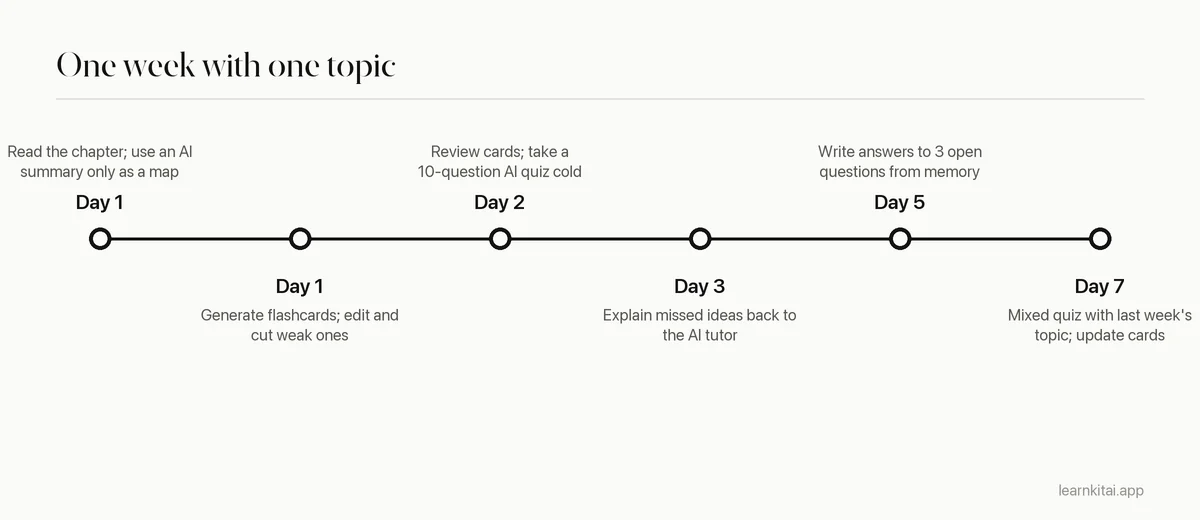
Notice that AI saves time on making materials, not on learning them. The hours you save writing cards and questions go back into answering them, spaced across the week. That trade is the whole point.
Some tools bundle these steps. In LearnKit, for example, you can add a PDF, lecture recording or web page and get a summary, flashcards, a quiz and open questions from the same source, so everything you practice traces back to your own material.
How do you use AI for studying different kinds of subjects?
Match the AI task to what the exam rewards. For fact-heavy subjects, use it to build flashcards and recall quizzes. For problem-solving subjects, use it for hints and fresh practice problems. For essay subjects, use it to generate counterarguments and critique your outline, never to write the essay.
Not every course is tested the same way, so the best use of AI changes with the subject. A simple way to decide is to ask what you will have to do on exam day, then make the AI give you practice at exactly that.
- Memory-heavy courses (anatomy, vocabulary, history dates, pharmacology): have AI draft short, single-fact flashcards from your notes, then review them on a spaced schedule. Check every fact against the textbook.
- Problem-solving courses (math, physics, chemistry, economics): ask for new problems similar to your homework, try them alone, and only then ask for a hint or a worked check. Ask it to vary the numbers and the setup so you cannot rely on pattern matching.
- Concept-heavy courses (biology, psychology, law): ask for why and how questions, and practice explaining cases or mechanisms in full sentences. Compare your answers with your lecture notes.
- Writing courses (literature, history essays, philosophy): use AI to argue against your thesis or point out gaps in your outline, then do the writing yourself.
Studying in a second language adds one more use: ask AI to explain a dense paragraph in simpler words, then answer questions about it in the original language. Our guide to studying in a second language covers this in detail.
Common mistakes when studying with AI
- Reading instead of recalling. A beautiful AI summary is still rereading. Close it and test yourself.
- Accepting every generated card. Bulk cards with vague or wrong backs waste review time. Edit before you study.
- Asking for the answer first. Try the problem, then ask for a hint. The struggle is where learning happens.
- Using general knowledge for course specifics. Your professor's definitions and emphasis matter on the exam. Ground AI in your materials.
- Skipping the spacing. One AI quiz the night before is cramming with extra steps. Spread practice across days.
Used well, AI for studying is less like a ghostwriter and more like a tireless study partner who keeps asking you questions. Keep it in that role, check what it says, and let it give you more practice than you could make by hand. For the AI-free foundations underneath all of this, read our guide to active recall. If you study in a browser, our list of Chrome extensions for students shows tools that bring these workflows to any page.
Frequently asked questions
Which AI tool is best for studying?
The best tool is one that works from your own course material and makes you answer questions, rather than one that only writes summaries. General chatbots can do this with the right prompts, and dedicated study tools build it into the workflow.
Can AI replace a human tutor?
For practice, explanations and feedback on routine problems, a well-designed AI tutor can help a lot. Human tutors are still better at spotting motivation problems, adapting to your goals and catching subtle misconceptions.
Is it okay to use AI to summarize readings I did not do?
It can help you catch up, but a summary alone gives you shallow knowledge that fades fast. If you rely on it, at least quiz yourself on the summary and read the key sections the questions point you to.
How do I stop relying on AI too much?
Set a rule to attempt every problem on your own first, for example for ten minutes, before asking for a hint. Then try a similar problem with no AI help to check that you can now do it alone.
Does AI work for subjects like math?
AI can explain steps and generate practice problems, but it still makes calculation and reasoning errors. Check worked solutions carefully and use it mostly for hints and practice rather than final answers.
Sources
- Share of teens using ChatGPT for schoolwork doubled from 2023 to 2024, Pew Research Center (26 percent of US teens used ChatGPT for schoolwork, up from 13 percent; 54 percent say research use is acceptable, 18 percent for essays)
- Generative AI without guardrails can harm learning: Evidence from high school mathematics, PNAS (via PubMed Central) (Practice grades up 48 percent (GPT Base) and 127 percent (GPT Tutor); exam grades down 17 percent for GPT Base)
- AI tutoring outperforms in-class active learning: an RCT introducing a novel research-based design in an authentic educational setting, Scientific Reports (via PubMed Central) (194 physics students; median learning gains with the AI tutor more than double)
- Improving Students' Learning With Effective Learning Techniques, Psychological Science in the Public Interest (PubMed) (Practice testing and distributed practice rated high utility; summarization, highlighting and rereading low)
- Repeated test-taking better for retention than repeated studying, research shows, Washington University in St. Louis (61 percent recall after one week with testing vs 40 percent with restudying)
- BBC research shows issues with answers from artificial intelligence assistants, BBC Media Centre (51 percent of AI answers had significant issues; 19 percent of answers citing BBC content introduced factual errors)
Keep reading
AI Flashcard Generator Tips: Make Cards Worth Reviewing
AI can draft a deck in seconds. Whether that deck helps you depends on a ten-minute edit most students skip.
AI Quiz Generator: Turn Any Chapter Into a Practice Test
Taking a quiz teaches you more than rereading. An AI quiz generator makes practice tests cheap, as long as you use them the right way.
AI Summarizer Accuracy: What Gets Lost, and How to Check
AI summaries are fluent and fast, and usually mostly right. Here is where they slip, and a five-minute check before you study from one.
AI Hallucinations in Study Notes: A 10-Minute Error Check
AI notes can sound perfect and still be wrong. Learn where errors hide and a quick routine to catch them before they reach your exam.
AI Academic Integrity: Where Help Ends and Cheating Starts
The tool is rarely the problem. What you submit as your own thinking is. A simple test for staying honest while studying with AI.
Dyslexia Study Tools: AI That Reads, Chunks and Quizzes
Dyslexia makes long reading slow and tiring, not learning impossible. These AI tools cut the reading load and shift effort to remembering.