Chrome Extensions for Students: Keep 5, Delete the Rest
Most students need only five kinds of Chrome extensions: a site blocker for focus, a study tool that turns pages and videos into questions, a citation manager, a read-aloud tool, and a password manager. Remove the rest, check each one's permissions, and keep a separate Chrome profile just for studying.
Open your Chrome extensions page right now. Most students find a long row of icons: three coupon finders, two screenshot tools, a color picker from one design class, and a dark mode they forgot about. Each one can read some of your browsing, and few of them help you learn. The best chrome extensions for students are a short list, chosen on purpose, with the rest deleted.
This guide gives you the five kinds worth keeping, a five-minute safety audit, and a browser setup that makes focused study the default instead of a fight.
Which Chrome extensions for students are worth keeping?
Five kinds cover almost everything: a website blocker, a study tool that turns pages into practice, a citation manager, a read-aloud tool, and a password manager. Anything else should earn its place by saving you time every week.
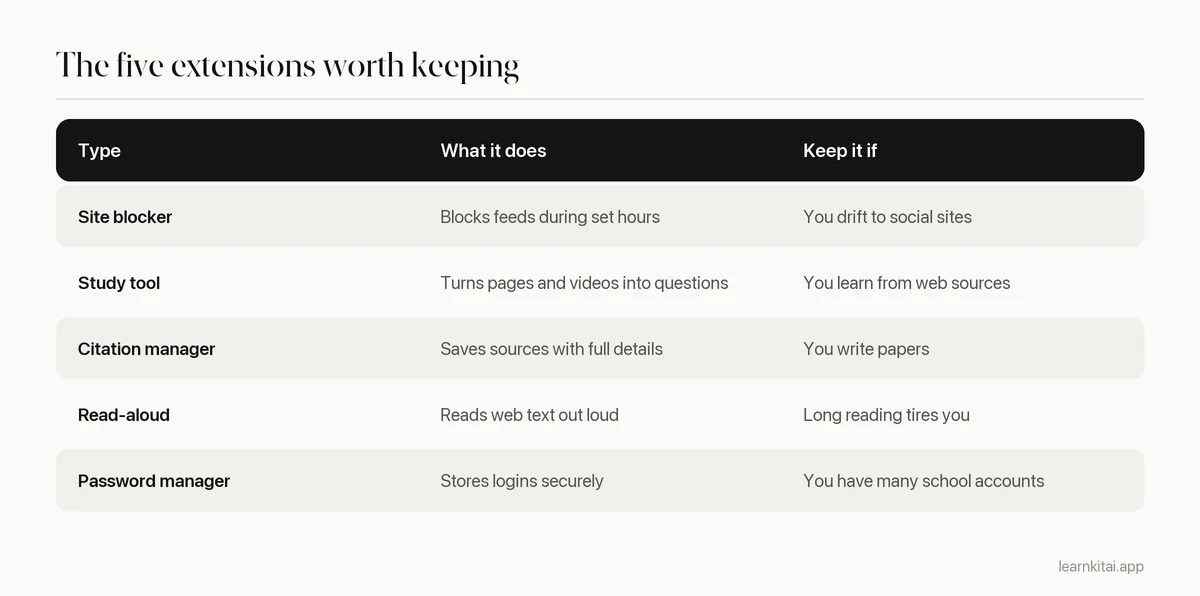
A citation manager such as the Zotero Connector pays for itself the first time you write a bibliography. A read-aloud tool helps anyone who studies better by ear, and it is especially useful with dyslexia study tools. The two that change your daily habits most, though, are the blocker and the study tool.
Do website blockers really help you focus?
They help by removing the choice. Research shows attention on screens switches very often, and that even a nearby phone can drain focus. A blocker cannot make you study, but it takes the easiest escape off the table during set hours.
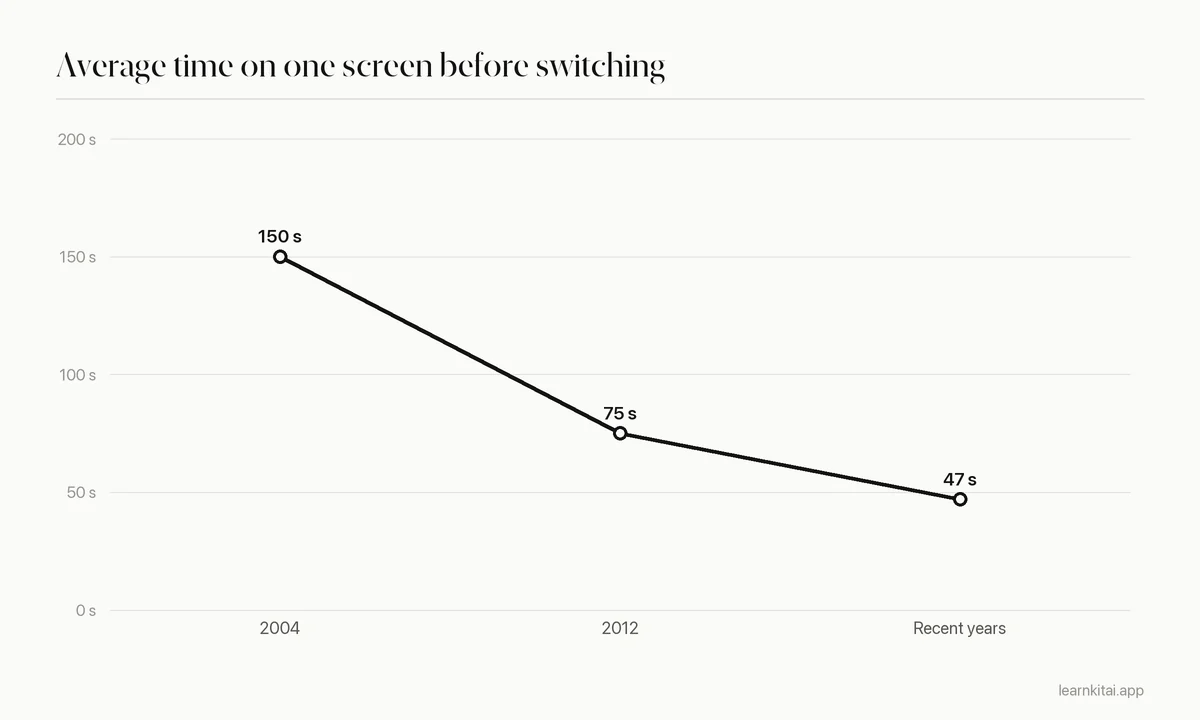
UC Irvine researcher Gloria Mark has tracked screen attention for two decades. Her team found people stayed on one screen for about 2.5 minutes before switching in 2004, and that the average has fallen to about 47 seconds in recent years. Every switch to a feed is a small exit from deep thinking.
Your laptop's own distractions also affect learning in class. A study by Sana and colleagues found that students who multitasked on laptops during a lecture scored lower, and so did classmates who could see their screens. A blocker set for class hours protects you and the people behind you. Pair it with a plan for your phone, too; see phone distraction while studying.
Are Chrome extensions safe for students?
Most are, but some ask for far more access than they need. An extension that can see your data on every website could, in principle, see your school email and bank pages. Install only what you use, from known publishers, and check permissions.
Google's own help page explains that an extension with access to your data on all the websites you visit can view and change what is on each page you browse, including banking and social media sites. Some tools need that to work. A dark mode or a page reader has to see the page, after all. The question is whether you trust the publisher and whether you use the tool enough to justify it.
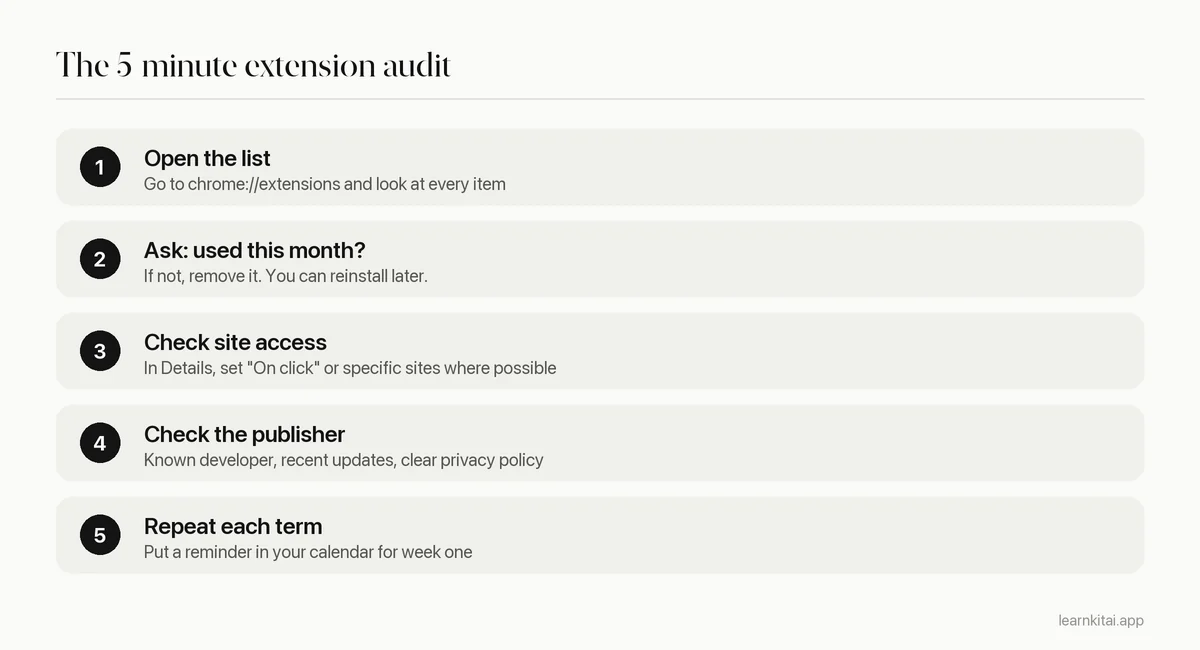
The site access setting in step three is underused. Many extensions work fine on "On click," which means they only see a page when you press their icon. That one switch cuts most of the risk.
What about AI writing extensions?
Some of the most popular chrome extensions for students now promise to write, rewrite or answer for you on any page. Be careful here for two reasons. First, they usually need access to every site you visit, including your learning platform and email. Second, a tool that drafts your discussion post or quiz answer can break your course rules on AI, even if it feels like a small shortcut. Grammar fixes are usually fine; generated text often is not. If you are unsure where your course draws the line, read AI and academic integrity before you install anything that writes for you.
How can an extension help you study a web page or video?
A study extension can turn the article or video you are looking at into a summary, flashcards or quiz questions without copying and pasting. That shifts web reading from passive scrolling to active recall.
Much of what you study lives in the browser: assigned articles, online textbooks, lecture videos on YouTube. Reading or watching is a start, but you remember far more when you test yourself afterward. A side-panel study tool keeps the source on the left and the questions on the right, so you can check an answer in seconds. For long readings, see how to summarize an article fast; for videos, flashcards from a YouTube video.
The LearnKit Chrome extension works this way. It opens in the side panel and studies the current page, a YouTube video or text you select, then gives you a summary, flashcards or a quiz.
How should you set up Chrome for studying?
Create a separate Chrome profile for study. Give it only your study extensions, your school bookmarks and the blocker. Your personal profile keeps everything else. Switching profiles becomes a clear signal that study time has started.
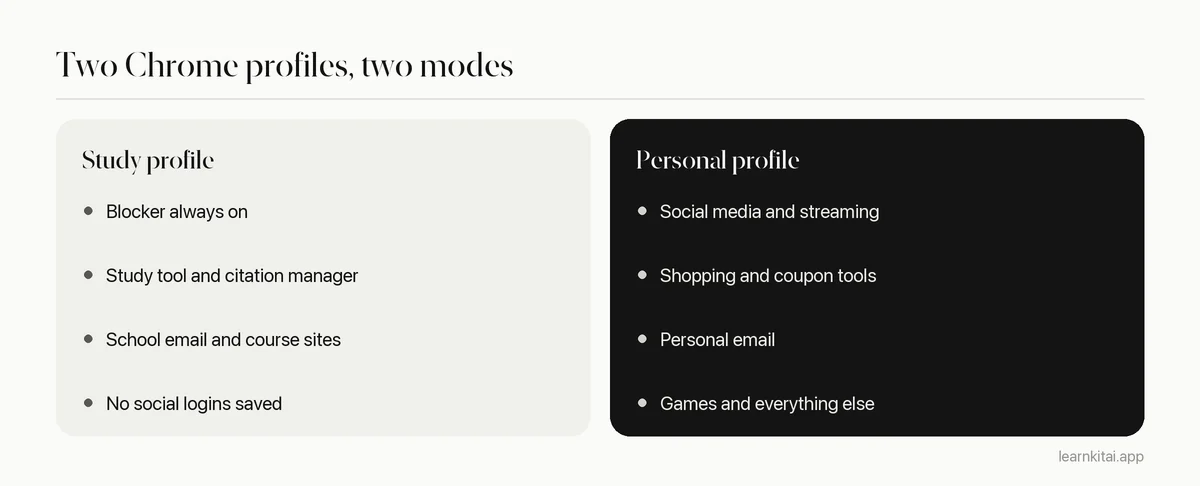
This takes ten minutes to set up and removes a surprising amount of friction. When your study window opens with only course tabs and no feed one click away, focus stops depending on willpower. It is the browser version of the clean desk idea in how to focus on studying.
Common mistakes
- Installing every "top 20 extensions for students" list at once.
- Leaving site access on "all sites" when "on click" would work.
- Keeping a blocker you can switch off in one click during study hours.
- Using an AI extension only to read summaries, never to test yourself.
- Forgetting that each extension can slow Chrome down a little.
Fewer, better extensions make your browser calmer, faster and safer. Keep the ones that help you focus and learn, and let the rest go. For more ways to bring AI tools into your routine, read how to use AI to study.
Frequently asked questions
Do Chrome extensions work on school Chromebooks?
Often only if your school allows them. Managed Chromebooks can block installs or limit you to an approved list. Ask your school's IT team if an extension you need is missing.
Will extensions slow down my browser?
Each one adds a little load, and some add a lot. If Chrome feels sluggish, disable extensions one at a time to find the cause, and remove any you do not use.
Are free extensions safe?
Many free extensions are safe and well maintained. Price is not the signal; the publisher, update history, reviews and the permissions requested are. Be extra careful with extensions that ask for access to all sites.
Can I use a study extension on PDFs in Chrome?
Some extensions can read PDFs opened in the browser and some cannot, depending on how they are built. If one does not work, upload the PDF to the tool's web version instead.
Sources
- Can't pay attention? You're not alone, University of California (UC Irvine) (Gloria Mark: attention on one screen about 2.5 minutes in 2004, 75 seconds by 2012, about 47 seconds in recent years.)
- Laptop multitasking hinders classroom learning for both users and nearby peers, Sana, Weston and Cepeda, Computers & Education, 2013 (Laptop multitaskers and peers in view of them scored lower on a test after a lecture.)
- Permissions requested by apps and extensions, Google Chrome Web Store Help (Explains the warning for access to your data on all websites you visit.)
Keep reading
AI for Studying: Make It Quiz You, Not Think for You
AI can make you a stronger student or a more dependent one. The difference is whether it does the thinking or makes you do it.
Phone Distraction: Why Silent Mode Is Not Enough
Your phone can cost you focus even when it is silent and face down. What the research shows, and a setup that actually keeps it out of your study time.
How to Focus When Your Mind Keeps Leaving the Room
Focus is not a trait you have or lack. It is the skill of noticing drift and coming back, and you can train it.
Summarize an Article Fast: Read Less, Keep More
Reading every word of a long article is the slow way to summarize it. A three-pass method gets you the main points in a fraction of the time.
Flashcards From YouTube Video: Pause Less, Recall More
Stop pausing every thirty seconds to type notes. Watch first, then turn the transcript into a small set of cards you can actually test yourself with.