Flashcards From YouTube Video: Pause Less, Recall More
To make flashcards from a YouTube video, watch it once without stopping, then open the transcript and mark the definitions, steps, examples and claims worth keeping. Turn each into a one-fact question, check names and numbers against the video, and test yourself the same day. AI tools can draft the cards from the link or transcript.
A good explainer video can teach a topic in ten minutes that a textbook takes thirty pages to cover. The catch is that watching feels like learning far more than it is. A week later you remember the presenter's voice and one diagram, and not much else. Making flashcards from YouTube video lessons fixes that, but the usual method of pausing every few seconds to type ruins the video. This guide shows a calmer workflow that uses the transcript, what to put on the cards, and how to use AI without trusting it blindly.
Can you really learn from a YouTube video with flashcards?
Yes. The video gives you understanding, and the cards give you retrieval practice, which is what makes knowledge last. Watching alone is passive; answering questions about the video a day later and a week later is what moves it into long-term memory.
Research on studying keeps finding the same thing: trying to recall information beats seeing it again. In Roediger and Karpicke's 2006 experiments, students who practiced recalling a passage remembered 61% of it a week later, compared with 40% for students who reread it. Rewatching a video is the video version of rereading. Cards let you test yourself instead. The broader idea is covered in active recall.
Making flashcards from YouTube video lessons, step by step
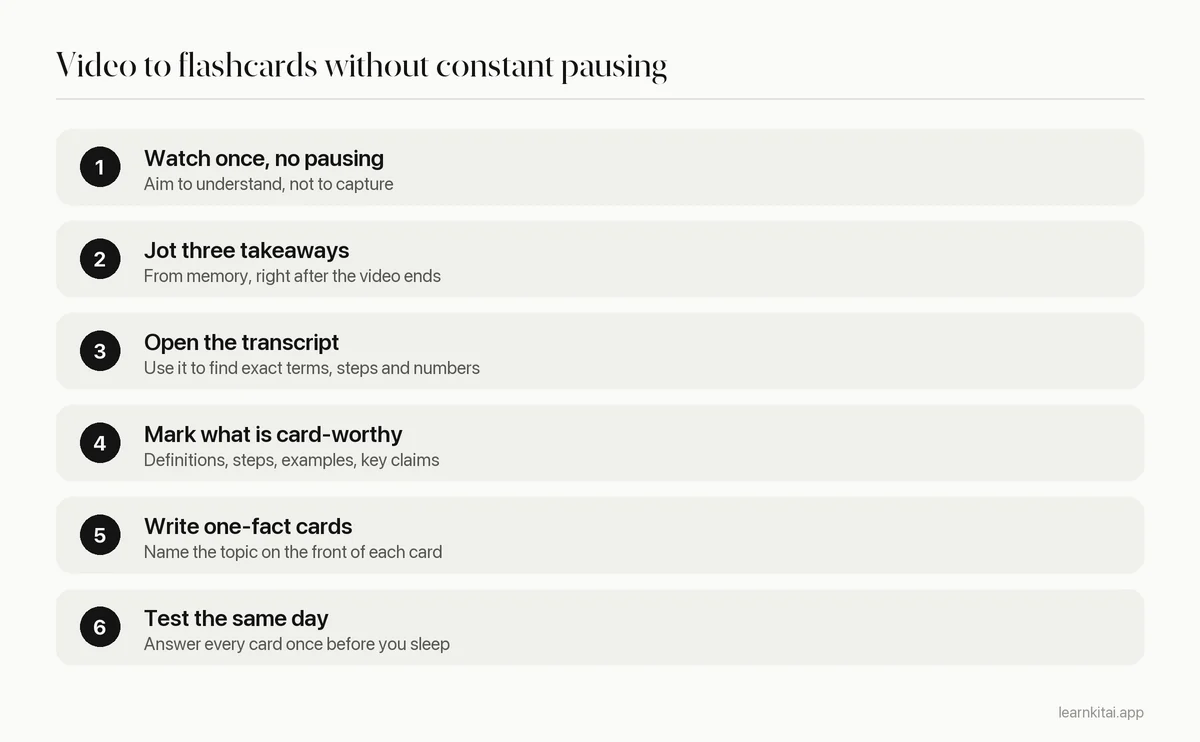
Step two matters more than it looks. Writing three takeaways from memory is a small act of recall, and it tells you what the video was really about. If you cannot name three, watch the hard part again before you make any cards.
Finding the transcript
On a computer, most YouTube videos have a transcript button in the expanded description area. Click it and the full text appears beside the video, with timestamps you can click to jump to that moment. You can copy the text from there. If the creator has not added captions, YouTube generates them automatically for many languages.
Are YouTube auto captions accurate enough to study from?
Mostly, but not for the details that matter most. YouTube itself says automatic captions are made by machine learning and their quality may vary. Accents, background noise and technical terms cause errors, so check every name, number and term against the audio before it goes on a card.
YouTube's own help page lists mispronunciation, accents, dialects and background noise as common causes of caption errors. For a casual history video that is fine. For a chemistry lecture where ethane and ethene sound alike, one wrong word on a card means you memorize a mistake. A quick rule: if a card's answer is a proper noun, a number or a technical term, click the timestamp and listen.
What should you put on cards from a video?
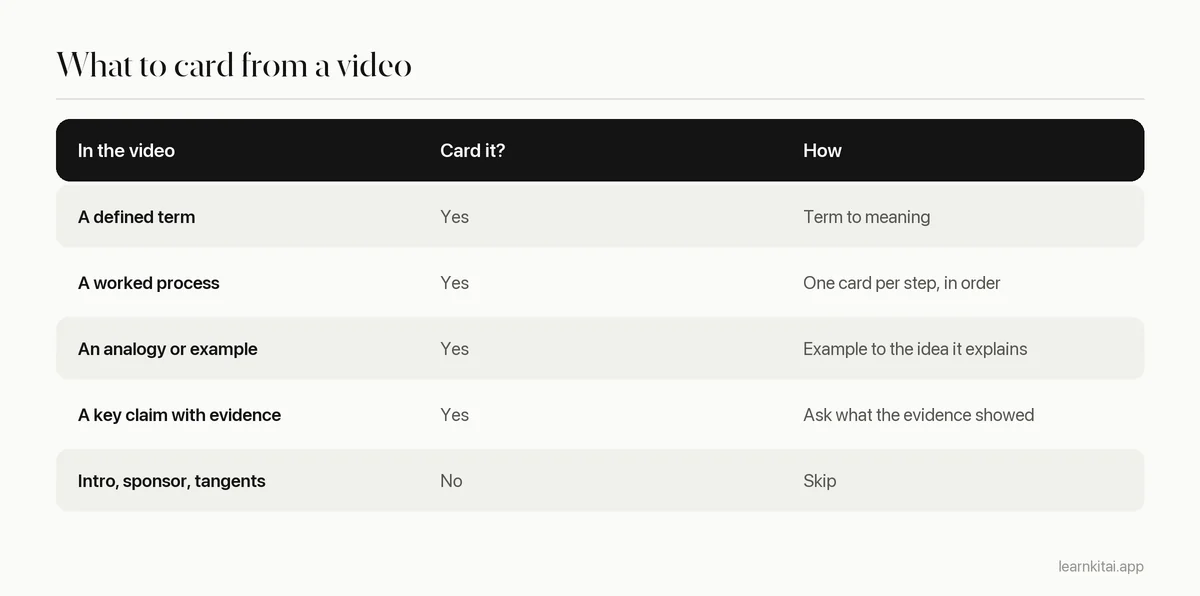
Definitions the presenter states, the steps of any process they walk through, the examples they use to explain an idea, and claims they support with evidence. Skip jokes, tangents and intros. Most ten-minute explainers produce a handful of solid cards, not dozens.
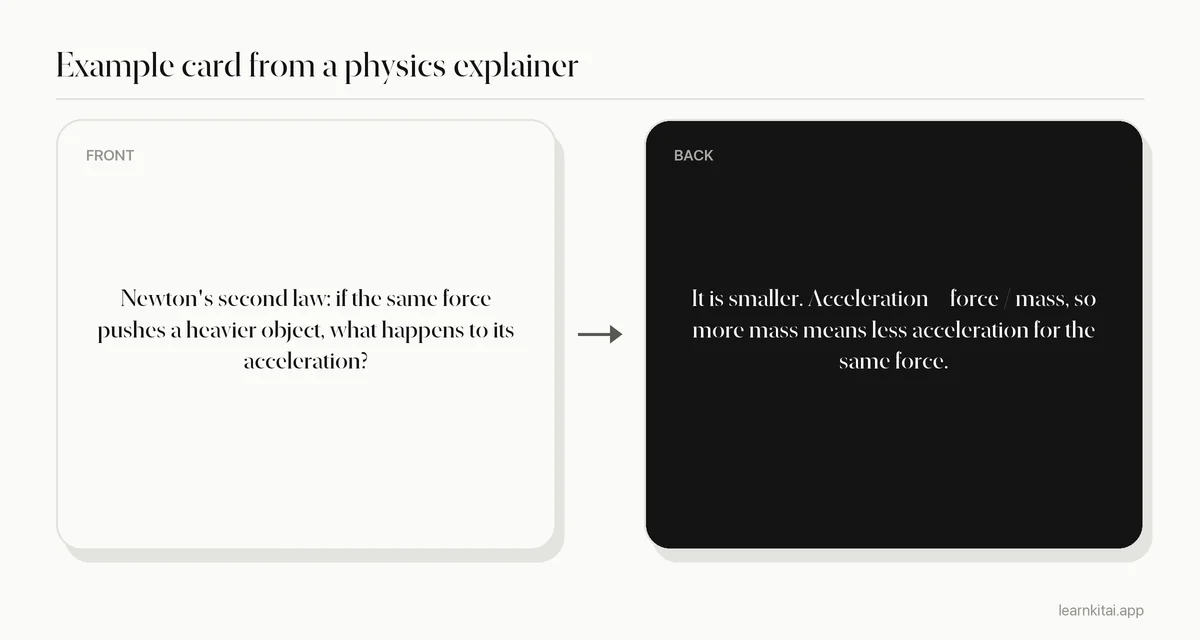
Notice that the card asks you to use the law, not recite it. Videos are good at building intuition, so cards from videos should test that intuition. Keep each one to a single idea, as explained in the minimum information principle.
Should you watch long lectures in one go?
Break them up. Research on online course videos found that shorter videos hold attention much better. For an hour-long lecture, watch one section, make its cards, then move on, so each batch of cards is built while the section is fresh.
That finding comes from a study of 6.9 million video sessions on edX by Philip Guo and colleagues, who concluded that shorter videos are much more engaging. You cannot shorten a professor's lecture, but you can split it. Use the chapter markers if the video has them, or the topic changes in the transcript if it does not. If you mainly want notes rather than cards from a long lecture, see how to summarize a YouTube video.
Can AI turn a YouTube link into flashcards?
Yes. Several tools read the transcript of a video and draft question and answer cards from it in seconds. The drafts are a starting point: delete trivia, split long answers, and check names and numbers, since errors in the captions can carry into the cards.
LearnKit's Chrome extension opens in the side panel next to a YouTube video and can turn it into a summary, flashcards or a quiz without leaving the page. The web version takes a YouTube link too. Either way, still do step one yourself: watch the video. Cards from a video you never watched are flashcards about words you have no picture for. For a wider look at these tools, read our guide to Chrome extensions for students.
How often should you review cards made from a video?
Answer them once on the day you watch, again the next day, and then at growing gaps of a few days, a week and longer. Mix them into your course deck so video cards and lecture cards come up together.
The schedule matters more than the source. Flashcards from YouTube video lessons behave like any other cards: they fade unless they come back at the right time. Put them in the same deck as the rest of the course, not in a separate deck per video, so a scheduler can space them out. The reasons are explained in spaced repetition explained.
One extra habit helps with videos in particular. When a card fails, click back to the timestamp and watch just that minute again. Seeing the presenter's diagram or example a second time, right after a failed recall, is a short and targeted rewatch. It is very different from playing the whole video again and hoping something sticks.
Mistakes to avoid
- Pausing constantly to take notes, so you never follow the argument.
- Making cards from a transcript without checking spoken numbers and names.
- Copying the presenter's sentences instead of asking a question about them.
- Carding the whole video, including the intro and the sponsor segment.
- Never reviewing. A deck made and abandoned is the same as rewatching once.
Videos are great for the moment of understanding. Flashcards are great for keeping it. Put the two together and a single good video can carry you through an exam. For the general rules of writing cards, read how to make effective flashcards.
Frequently asked questions
Should I take notes while watching or after?
For short videos, after. Watching without stopping helps you follow the full explanation, and the transcript means you will not lose details. For long lectures, take light notes during the video and build cards after each section.
What if the video has no transcript?
Many videos get automatic captions, but some do not, for example when the audio is poor or the language is not supported. In that case take brief notes while watching, or play it at a slower speed for the dense parts, and build cards from your notes.
Is it fine to watch YouTube lessons at faster speed?
For easy material, often yes. For new or dense topics, normal speed gives you time to think. A good test: if you cannot write three takeaways from memory afterwards, the speed was too high.
Sources
- How Video Production Affects Student Engagement: An Empirical Study of MOOC Videos, ACM Learning at Scale (Guo, Kim and Rubin, 2014) (Analysis of 6.9 million video watching sessions on edX; shorter videos are much more engaging.)
- Use automatic captioning, YouTube Help (Google) (Automatic captions are generated by machine learning and quality may vary; accents, dialects and noise cause errors.)
- Test-Enhanced Learning: Taking Memory Tests Improves Long-Term Retention, Psychological Science (Roediger and Karpicke, 2006) (61% vs 40% recall after one week for repeated testing vs repeated study.)
Keep reading
How to Make Flashcards That Still Work Three Weeks Later
Most flashcards fail before you ever study them, because of how they are written. Seven rules, real before and after cards, and a study routine that keeps them working.
Summarize YouTube Video Lectures Into Notes You Can Test
An hour-long lecture does not need an hour of notes. Here is how to turn a YouTube video into a one-page, timestamped summary you can actually study from.
Minimum Information Principle: Small Cards, Big Recall
One flashcard, one fact. Here is why splitting fat cards into tiny ones makes reviews faster and memories stronger, with worked examples.
Turn Notes Into Flashcards in 20 Minutes After Class
Your lecture notes are a reading pile until you turn them into questions. A simple 20-minute routine converts each class into cards you can actually test yourself with.
Chrome Extensions for Students: Keep 5, Delete the Rest
Most students run too many extensions and use few of them. Here are the five kinds worth keeping, a safety check, and a study-only browser setup.