Study Plan Generator: Build a Plan You Will Actually Follow
A good study plan generator needs five inputs: your exam date, the topics and their weight, how confident you feel in each, the hours you really have, and your fixed commitments. Ask it for spaced review sessions built on self-testing, plan at about two thirds of your available time, and replan once a week.
Most study plans do not fail because of their color scheme or the app they live in. They fail on day three, when "Chapter 4, 1 hour" takes three hours and everything after it slides. A study plan generator can build a neat calendar in seconds, but a neat calendar is not the same as a plan you can follow. The difference comes from honest inputs, smart spacing and a rule for what to do when you fall behind.
This guide shows you what to tell an AI planner, why your time estimates are probably too low, how far apart to put reviews, and gives you a prompt you can copy.
What should you tell a study plan generator?
Give it your exam date, every topic with its rough share of the exam, a confidence rating for each, the hours you can truly study each day, and fixed commitments like work or classes. Vague inputs produce plans that look good and fall apart.
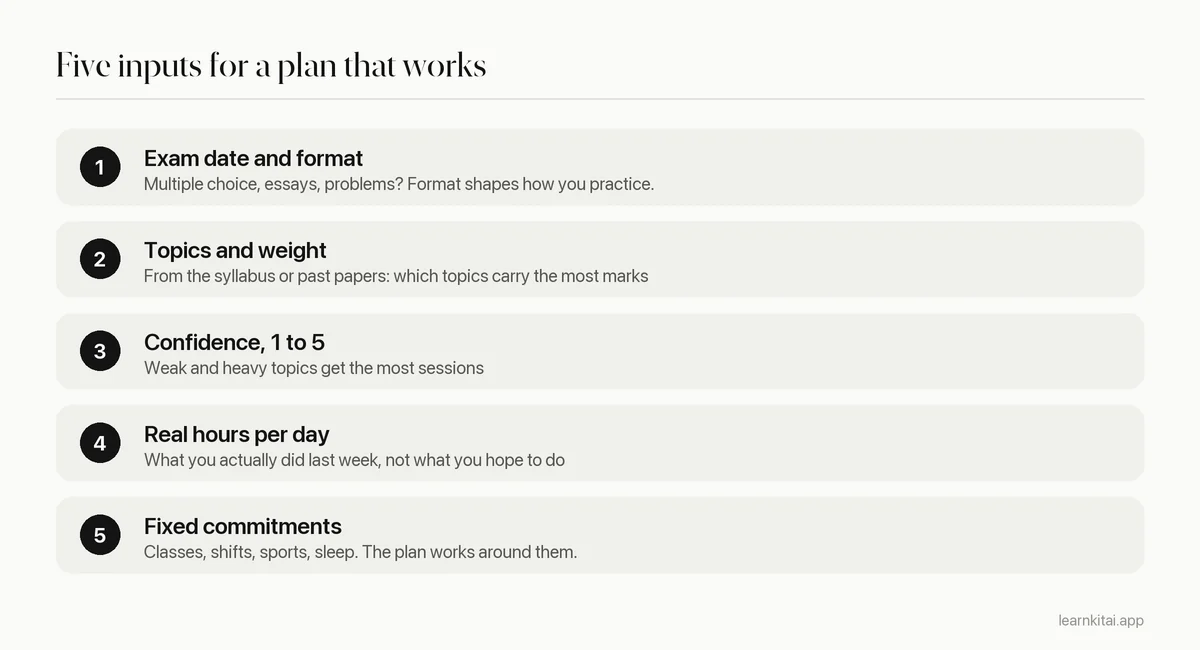
The confidence rating is the input most students skip, and it changes everything. Without it, a planner splits time evenly, so you spend as long on the topic you already know as on the one you dread. With it, the plan can put three sessions where you are weak and one where you are strong.
Why do study plans fall apart?
Mainly because people underestimate how long tasks take, even when they have done similar tasks before. Psychologists call this the planning fallacy. The fix is to plan at about two thirds of your available time and leave the rest as buffer.
In a classic study, Buehler, Griffin and Ross asked psychology students to predict when they would finish their honors thesis. Their best guess averaged 33.9 days. Their worst-case guess averaged 48.6 days. They actually took 55.5 days on average, and fewer than a third finished by their own best-guess date.
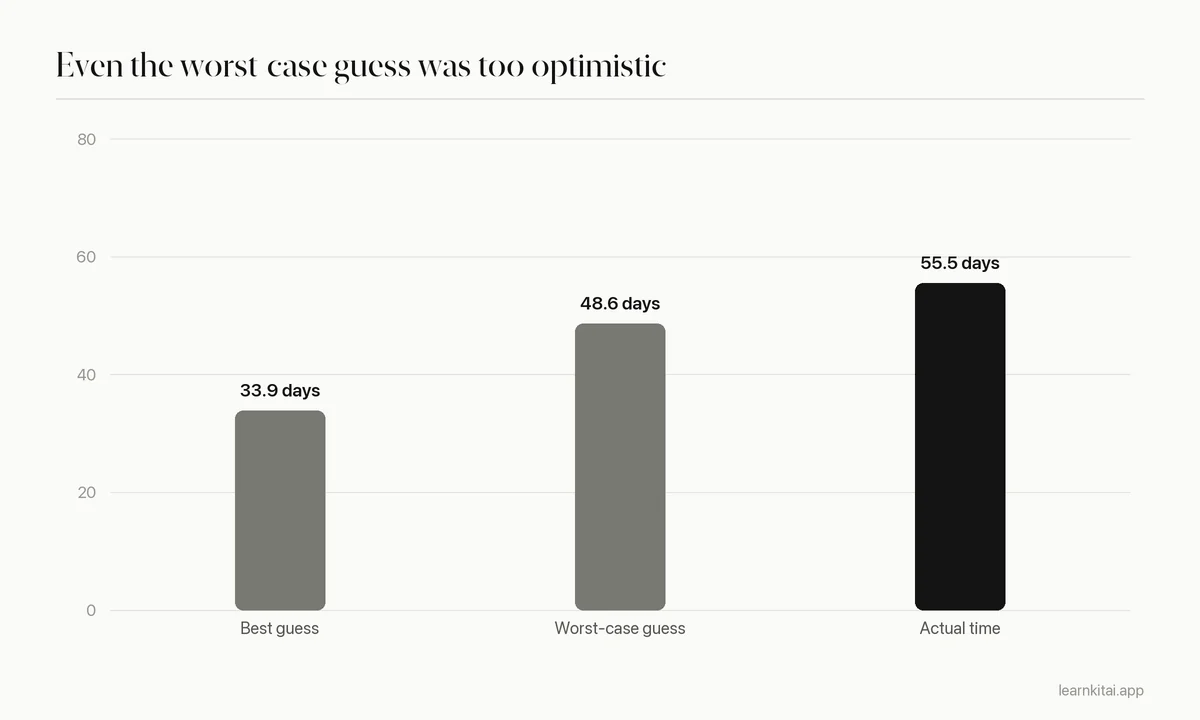
Notice that even the worst-case guess fell short. No study plan generator can fix this for you, because it only knows the numbers you give it. So build the buffer in yourself. If you have 3 hours a day, tell the generator you have 2. If it finishes your plan early, you get a free review day. If it runs late, as most plans do, you are still on track.
How far apart should review sessions be?
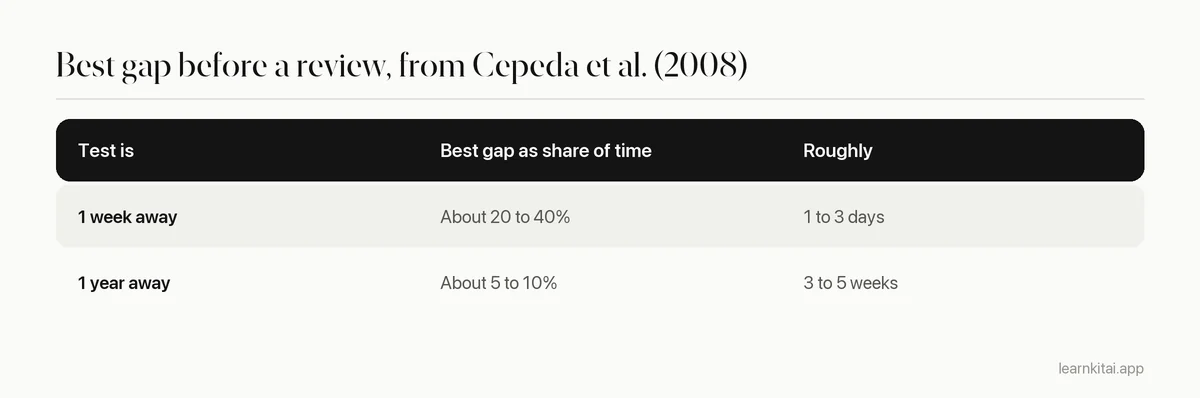
Space them out, with gaps that grow as the exam gets further away. In one large study, the best gap for a test a week away was about 20 to 40% of that week, while for a test a year away it was about 5 to 10% of the year.
Cepeda and colleagues taught more than 1,350 people a set of facts, gave them a review after different gaps, and tested them up to a year later. The best gap depended on when the test was. Too short a gap wasted the review; too long let too much fade first. In practice, that means a good plan never puts all of one topic in a single block. It returns to each topic several times.
For most course exams, which sit a few weeks out, that points to reviewing each topic every few days at first and then at longer intervals. Our guide to spaced repetition explains the idea, and the study schedule for exams shows a full calendar.
How do you get a good plan from an AI generator?
Give it all five inputs, ask for sessions that start with self-testing, require each topic to appear at least three times with growing gaps, and tell it to leave one buffer day per week. Then read it critically before you trust it.
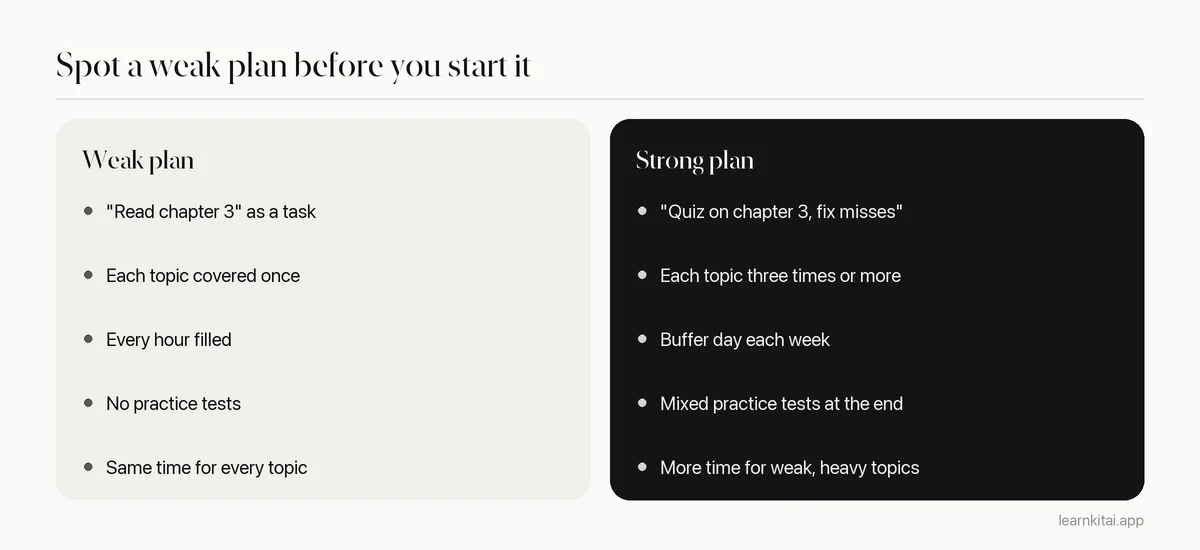
The verbs matter. A session called "read" or "go over" invites rereading. A session called "quiz," "explain" or "solve" invites recall, which is what builds memory. If your generated plan is full of passive verbs, ask it to rewrite each session as a testing task. For a full example of a strong plan in a tight window, see how to study for an exam in one week.
A quick example
Sam has a biology midterm in 14 days and four topics: cells (30% of marks, confidence 4), genetics (30%, confidence 2), evolution (20%, confidence 3) and ecology (20%, confidence 3). He really studies about 2.5 hours on weekdays, so he tells the planner 1.5. The plan gives genetics five sessions, cells three, and the other two four each, with every session opening on a short quiz. Days 6 and 11 are buffers, and days 13 and 14 are mixed practice tests. When a shift at work eats day 9, that session moves to the day 11 buffer and nothing else changes.
What should you do when you fall behind?
Do not push every missed session forward, which creates a pile-up. Drop or shrink the least valuable tasks, keep the weak and heavy topics, and replan the rest of the week from today. A weekly reset beats daily guilt.
- Use your buffer day first. That is what it is for.
- Score each remaining task: exam weight times how weak you feel. Keep the top half.
- Shrink, do not skip: a 25-minute quiz beats a skipped 90-minute session.
- Paste the trimmed list back into the generator and ask for a new plan from today.
If falling behind comes from not starting, not from running out of time, the problem is usually procrastination rather than planning. Short timed sessions help a lot there; our pieces on the Pomodoro technique and on procrastination go into it.
Tracking real study time also makes your next plan better, because you stop guessing your hours. The LearnKit iPhone app includes a Pomodoro focus timer and study stats, so you can see what a real week looks like.
An AI planner is a fast first draft, not a promise. Feed it honest numbers, insist on spaced self-testing, keep a buffer, and replan every week. For the wider picture of exam preparation, see how to study for finals, and for more AI tools, how to use AI to study.
Frequently asked questions
How many hours a day should a study plan include?
It depends on your course load and the exam, but the plan should match the hours you can sustain, not your best day. Track a normal week first, then plan slightly below that number to leave room for the unexpected.
Should I study one subject per day or mix them?
Mixing usually works better for memory. Two or three topics a day, rotating across the week, gives you natural spacing and keeps each session fresh. Save single-subject days for big practice tests.
Is a paper planner better than an AI planner?
Either can work. AI is faster at building and rebuilding the plan, which helps when life changes. Some students then copy the week onto paper because ticking boxes keeps them motivated.
When should I start making a study plan for finals?
As early as you can, ideally a few weeks out, so spaced reviews have room to work. Even a plan made one week before is far better than none; it just has fewer review rounds.
Sources
- Exploring the planning fallacy: Why people underestimate their task completion times, Buehler, Griffin and Ross, Journal of Personality and Social Psychology, 1994 (Thesis students predicted 33.9 days (worst case 48.6) but took 55.5 days; 29.7% finished by their best-guess date.)
- Spacing effects in learning: A temporal ridgeline of optimal retention, Cepeda, Vul, Rohrer, Wixted and Pashler, Psychological Science, 2008 (Over 1,350 participants; optimal gap about 20 to 40% of a 1-week test delay and 5 to 10% of a 1-year delay.)
Keep reading

AI for Studying: Make It Quiz You, Not Think for You
AI can make you a stronger student or a more dependent one. The difference is whether it does the thinking or makes you do it.
The Study Schedule That Works Backward From Exam Day
Most study plans fail because they start from today. Start from the exam date instead, count your real hours, and space every topic at least three times.
Spaced Repetition: Why Forgetting Is Part of the Plan
Reviewing right before you forget builds memories that last. Learn how long the gaps should be, with a ready schedule for exams one week to one semester away.
How to Study for an Exam in a Week, Day by Day
Seven days is enough to do well if you start with a diagnosis, revisit every topic every two or three days, and save the last day for rest.
How to Study for Finals: A 3-Week Plan That Holds Up
Finals reward the student who starts with a plan, not the one who studies longest. Here is a three-week system for triage, testing and sleep.